Loading
Form preview
  • US Legal Forms
  • Other Templates
  • More Forms
  • More Multi-State Forms
  • Texas Southern University Satisfactory Academic Progress Appeal 2022

Get Texas Southern University Satisfactory Academic Progress Appeal 2022-2026

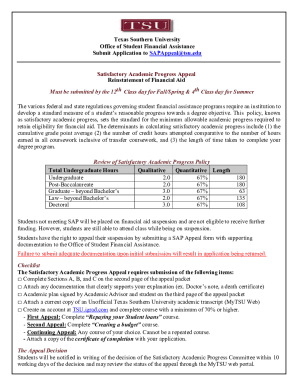
Texas Southern University Office of Student Financial Assistance Submit Application to SAPAppeal tsu.edu Satisfactory Academic Progress Appeal Reinstatement of Financial Aid Must be submitted by.

How it works

  1. Open form

    Open form follow the instructions

  2. Easily sign form

    Easily sign the form with your finger

  3. Share form

    Send filled & signed form or save

How to fill out the Texas Southern University Satisfactory Academic Progress Appeal online

This guide provides a clear and supportive pathway for users to navigate the Texas Southern University Satisfactory Academic Progress Appeal form online. By following the steps outlined below, individuals can ensure that their appeal is submitted accurately and efficiently.

Follow the steps to complete your appeal form successfully.

  1. Use the ‘Get Form’ button to access the Texas Southern University Satisfactory Academic Progress Appeal form and open it in your preferred digital editor.
  2. Begin by filling out Section A, which requires your personal information. Provide your name, address, student ID number, telephone number, and email address clearly.
  3. In Section B, indicate the reason for your appeal by checking the appropriate boxes related to your GPA, completion ratio, or exceeding maximum hours.
  4. Section C requires a summary of your action plan to enhance your academic performance. Use the provided space or attach a typed statement if more space is needed.
  5. In Section D, confirm completion of the required financial literacy session. Specify the course completed and ensure you attach the certificate of completion to your appeal.
  6. Ensure you complete the checklist mentioned at the beginning of the appeal form, which includes sections A, B, and C, documentation of your circumstances, and your academic plan signed by both you and your academic advisor.
  7. Once you have filled out and reviewed all sections of the appeal form, save your changes. Depending on your preference, you may download, print, or share the completed application.

Take the first step towards your academic future by completing your Satisfactory Academic Progress Appeal online today.

Get form

Experience a faster way to fill out and sign forms on the web. Access the most extensive library of templates available.
Get form

Related content

State Financial Aid Program Guidelines 2021-22...
Oct 15, 2021 — Texas Higher Education Coordinating Board. 2021-22. State Financial Aid...
Learn more
Satisfactory Academic Progress Appeal
This policy, known as satisfactory academic progress, sets the standard for the minimum...
Learn more
services - FDA
Apr 9, 2014 — As described in detail above, you created and submitted false...
Learn more

Related links form

Motorcycle Club Bylaws Pdf Written Notice Of Pleading CITY OF JACKSONVILLE SIGN PERMIT APPLICATION Filing Fee - Jacksonvilleor Usssa Pick Up Player Form

Questions & Answers

Get answers to your most pressing questions about US Legal Forms API.

Contact support

Most colleges allow appeals; some do not. Students must make the appeal in writing and must explain why they failed to maintain satisfactory academic progress. The appeal must also identify the changes in the student's situation that will allow them to satisfy the college's academic progress standards.

Students must meet and maintain certain requirements to continue to receive financial support, including adhering to their school's satisfactory academic progress (SAP) policy. Failure to do so could result in a financial aid warning or probation, which may affect your future eligibility for aid.

First Paragraph: Describe what happened that prevented you from meeting SAP. I am writing to explain the circumstance that hindered my performance during the past semester. I didn't perform adequately in my sciences courses, but I completed my three humanities based classes and performed well.

Meeting All SAP Standards You may be able to regain it by attempting credits on your own (without aid) until you meet all SAP standards. At that time, please contact the Financial Aid Office.

A SAP appeal may be based on undue hardship when the failure to make satisfactory academic program is caused by the death of a relative of the student, severe personal injury or illness of the student, or other special circumstances determined by the school.

Financial aid warning Students who fail to make satisfactory progress after the warning period lose their aid eligibility unless they successfully appeal and are placed on probation. Schools do not need to use the warning status; they can instead require students to immediately appeal to be placed on probation.

If you don't make satisfactory academic progress, the school may give you a financial aid warning. You'll still receive financial aid during the warning period, which typically lasts for one academic term. If you don't catch up by the end of your warning period, your federal financial aid will be suspended.

If a student's SAP appeal is not approved, they will not be eligible to receive Financial Aid for that academic year. If the student chooses to remain enrolled for that semester, they are responsible for the charges incurred on their account.

Get This Form Now!

Use professional pre-built templates to fill in and sign documents online faster. Get access to thousands of forms.
Get form
If you believe that this page should be taken down, please follow our DMCA take down processhere.
Get Texas Southern University Satisfactory Academic Progress Appeal
Get form
  • Adoption
  • Bankruptcy
  • Contractors
  • Divorce
  • Home Sales
  • Employment
  • Identity Theft
  • Incorporation
  • Landlord Tenant
  • Living Trust
  • Name Change
  • Personal Planning
  • Small Business
  • Wills & Estates
  • Packages A-Z
  • Affidavits
  • Bankruptcy
  • Bill of Sale
  • Corporate - LLC
  • Divorce
  • Employment
  • Identity Theft
  • Internet Technology
  • Landlord Tenant
  • Living Wills
  • Name Change
  • Power of Attorney
  • Real Estate
  • Small Estates
  • Wills
  • All Forms
  • Forms A-Z
  • Other Templates
  • Legal Hub
  • About Us
  • Help Portal
  • Legal Resources
  • Blog
  • Affiliates
  • Contact Us
  • Delete My Account
  • Site Map
  • Industries
  • Forms in Spanish
  • Localized Forms
  • State-specific Forms
  • Forms Kit
  • Real Estate Handbook
  • All Guides
  • Notarize
  • Incorporation services
  • For Consumers
  • For Small Business
  • For Attorneys
  • USLegal
  • FormsPass
  • pdfFiller
  • signNow
  • altaFlow
  • DocHub
  • Instapage
Form Packages
  • Adoption
  • Bankruptcy
  • Contractors
  • Divorce
  • Home Sales
  • Employment
  • Identity Theft
  • Incorporation
  • Landlord Tenant
  • Living Trust
  • Name Change
  • Personal Planning
  • Small Business
  • Wills & Estates
  • Packages A-Z
Form Categories
  • Affidavits
  • Bankruptcy
  • Bill of Sale
  • Corporate - LLC
  • Divorce
  • Employment
  • Identity Theft
  • Internet Technology
  • Landlord Tenant
  • Living Wills
  • Name Change
  • Power of Attorney
  • Real Estate
  • Small Estates
  • Wills
  • All Forms
  • Forms A-Z
  • Other Templates
Customer Service
  • Legal Hub
  • About Us
  • Help Portal
  • Legal Resources
  • Blog
  • Affiliates
  • Contact Us
  • Delete My Account
  • Site Map
  • Industries
  • Forms in Spanish
  • Localized Forms
  • State-specific Forms
  • Forms Kit
Legal Guides
  • Real Estate Handbook
  • All Guides
Prepared for you
  • Notarize
  • Incorporation services
Our Customers
  • For Consumers
  • For Small Business
  • For Attorneys
Our Sites
  • USLegal
  • FormsPass
  • pdfFiller
  • signNow
  • altaFlow
  • DocHub
  • Instapage
Social Media
Call us now toll free:
+1 833 426 79 33
As seen in:
© Copyright 1999-2026 airSlate Legal Forms, Inc. 17 Station Street, Ste. 203, Brookline, MA 02445
  • Your Privacy Choices
  • Terms of Service
  • Privacy Notice
  • Content Takedown Policy
  • Bug Bounty Program