Loading
Get Uk Railways Pension Scheme Pm42 2018-2026
How it works
-

Open form follow the instructions
-

Easily sign the form with your finger
-

Send filled & signed form or save
How to fill out the UK Railways Pension Scheme PM42 online
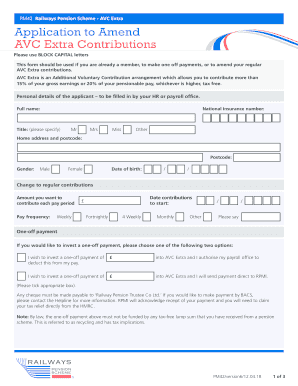
Filling out the UK Railways Pension Scheme PM42 is an essential process for users who wish to amend their AVC Extra contributions or make one-off payments. This guide will provide clear, step-by-step instructions to help you navigate the form effectively.
Follow the steps to complete the PM42 form accurately.
- First, click the ‘Get Form’ button to obtain the PM42 form. This will open the document for you to begin filling it out.
- Provide your personal details. You will need to enter your full name, title, National Insurance number, home address, postcode, gender, and date of birth. Ensure all information is filled out using block capital letters.
- Indicate your regular contribution details. Specify the amount you want to contribute each pay period and select your pay frequency (weekly, fortnightly, 4-weekly, monthly, or other). Additionally, enter the date you wish for contributions to start.
- If opting for a one-off payment, choose one of the provided options: either deduct the specified amount from your pay or send payment directly to RPMI. Make sure to tick the appropriate box and enter the amount.
- Select your investment choices. Indicate if you want your contributions directed to a fund choice, including the option of a Lifestyle Strategy or specific funds. Fill in the percentage you wish to allocate to each option, ensuring that the total equals 100%.
- Set your target retirement age. Enter your desired age for the Lifestyle Strategy, or leave it blank so it defaults to your Pension Age.
- Read and confirm the declaration, ensuring you comply with the tax-free lump sum rules. Sign and date the form.
- Finally, submit the completed form to your HR or payroll office for verification and processing.
Act now to complete your UK Railways Pension Scheme PM42 form online and ensure your contributions are accurately managed.
If you would like to increase your contributions contact the Tesco Pensions Helpline on 0345 070 1113 or find out more online at TheColleagueRoom.com If you access this website it will enable you to monitor your retirement savings.