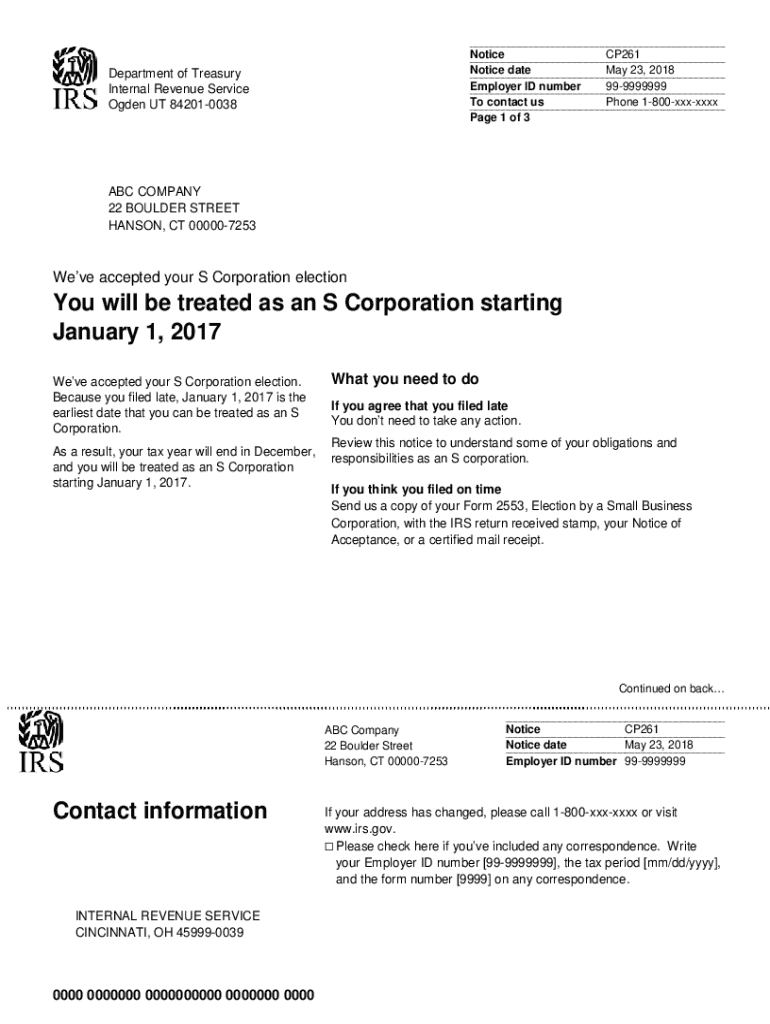
Notice date Employer ID number To contact us Page 1 of 3 Department of Treasury Internal Revenue Service CP261 September 5, 2011, We've accepted your S Corporation election You will be treated as.

Open form follow the instructions

Easily sign the form with your finger

Send filled & signed form or save
How to fill out the IRS Notice CP261 online
Navigating IRS documents can be overwhelming, but this guide provides clear, step-by-step instructions on how to fill out the IRS Notice CP261 online. By following these directions, you will ensure that your form is completed accurately and efficiently.
Follow the steps to complete the IRS Notice CP261 online.
- Press the ‘Get Form’ button to access the IRA Notice CP261 form and open it in your preferred editing tool.
- Review the notice date and employer ID number at the top of the form to ensure they match your records.
- In the section outlining the acceptance of your S Corporation election, confirm the effective date is correct based on your filing.
- If you agree with the late filing, no further action is necessary, but consider reviewing the obligations as an S Corporation.
- If you believe you filed on time, gather and attach the required documentation, such as a copy of your Form 2553 with the received stamp.
- If you did not file on time or cannot prove timely filing, determine if you qualify for relief as detailed in the notice. Follow the instructions for including necessary documentation.
- Make sure to review any reminders regarding payments to shareholder-employees and calculate the reasonable salary as required.
- Ensure to keep track of stock and debt basis information for shareholders as outlined in the notice.
- Once all necessary fields and attachments are complete, save your changes, download a copy, or print the form for your records.
Complete your IRS Notice CP261 online today to ensure compliance and maintain accurate records.
Experience a faster way to fill out and sign forms on the web. Access the most extensive library of templates available.
Related content
Jan 5, 2023 — CP261 is the approval notice for Form 2553, Election by a Small Business...
Oct 22, 2004 — CP261, Notice of Acceptance as an S corporation. ... notice within 60...
1-800-TAX-FORM (1-800-829-3676). • Keep this notice for you records. If you need...
Get answers to your most pressing questions about US Legal Forms API.
What is notice CP261?
The CP261 Notice is the official IRS recognition letter confirming that your business has been recognized as an S corporation for tax purposes with the effective date. You should receive this notice approximately 60 days after filing the Form 2553.
How do I get a copy of my CP261 notice?
If you lose your CP261 Notice, you can also call the IRS (800-829-4933) and request an “S-Corp Verification Letter”, technically known as a 385C. The CP261 can only be generated once (it's auto-generated internally at the IRS), however the CP261 and 385C have the same effect.
How do I know if my IRS accepted an S corp election?
The corporation will receive an acknowledgement if the S corporation election is accepted and when it will take effect. The corporation will also be notified if the election isn't accepted. If the notification of acceptance or nonacceptance is not received, the corporation should follow up by calling 800-829-4933.
What is the IRS acceptance letter CP261?
The CP261 Notice officially confirms that your S Corporation has been established. Going forward, your S Corporation's business activity will be reported on the 1120s Business Tax Return.
Use professional pre-built templates to fill in and sign documents online faster. Get access to thousands of forms.
If you believe that this page should be taken down, please follow our DMCA take down process here.