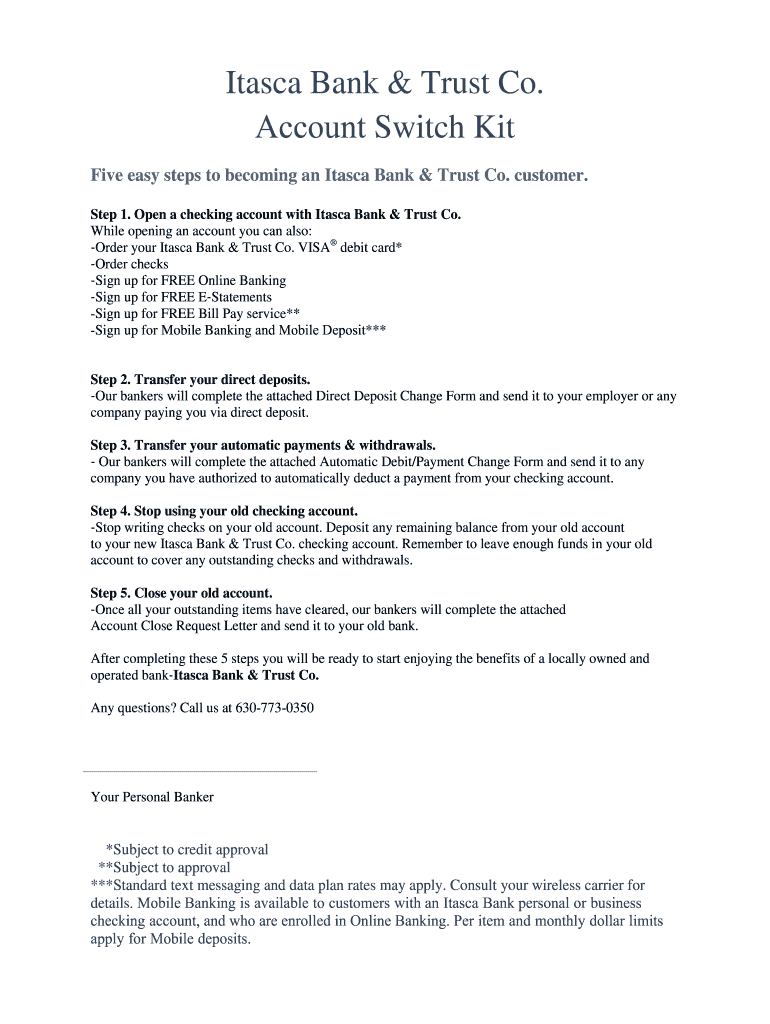
ITASCA BANK & TRUST CO. EASY SWITCH KIT It is my pleasure to welcome you to Itasca Bank & Trust Co. Since 1948, our reputation for delivering exceptional banking services to individuals, families,.
Loading

Open form follow the instructions

Easily sign the form with your finger

Send filled & signed form or save
How to fill out the IL Itasca Bank & Trust Co Account Switch Kit online
This guide provides clear instructions on how to complete the IL Itasca Bank & Trust Co Account Switch Kit online. Follow these steps to ensure a smooth transition to your new banking experience.
Follow the steps to complete your account switch kit.
- Click ‘Get Form’ button to access the form and open it in the designated editor.
- Begin by completing your personal information at the top of the form, including your name and contact details. Ensure that all information is accurate to facilitate your switch.
- Locate the section for opening a checking account. Here, you may opt to order your Itasca Bank & Trust Co. VISA® debit card, sign up for online banking and other services. Make your selections carefully.
- Fill out the Direct Deposit Change Form. Provide the company name, address, and your existing bank details. Ensure that you clearly state your intention to change to your new Itasca Bank & Trust Co. account.
- Complete the Automatic Debit/Payment Change Form in the same manner. Include details for any companies that withdraw payments from your old bank account.
- Stop using your old checking account after transferring all automatic payments and direct deposits. Remember to keep sufficient funds to cover any outstanding transactions.
- Fill in the Account Close Request Letter with your old bank details. Include your instruction for closure of your previous accounts and specifying the address for any remaining balance to be sent.
- After filling out and reviewing all sections of the forms, save your changes, download, and/or print the completed documents for your records. You may also share them as needed.
Get started on your account switch today by filling out the IL Itasca Bank & Trust Co Account Switch Kit online.
Experience a faster way to fill out and sign forms on the web. Access the most extensive library of templates available.
Get answers to your most pressing questions about US Legal Forms API.
What is your routing number?
The routing number is the nine-digit number printed in the bottom left corner of each check. Your specific account number (usually 10 to 12 digits) is the second set of numbers printed on the bottom of your checks.
What is a Fedwire routing number?
A Fedwire (or ABA) code is a bank code used in the United States, which identifies financial institutions. Fedwire/ABA codes are always nine (9) digits in length. You will need to request the Fedwire/ABA Code from the payment recipient.
Does Trustco bank do wire transfers?
Part IV – Wire Transfers. Customer may transfer funds to domestic and/or international payees from its Accounts in such amounts, frequency and/or other limits as the Bank may approve.
What is the routing number for Itasca Bank?
Simply give the company you wish to debit your account the Bank's routing number (071922175) and your account number.
Use professional pre-built templates to fill in and sign documents online faster. Get access to thousands of forms.
If you believe that this page should be taken down, please follow our DMCA take down process here.