Loading
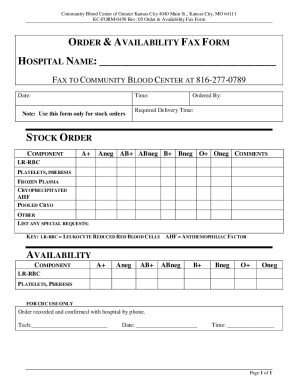
Get Mo Community Blood Center Order & Availability Fax Form 2022-2026
How it works
-

Open form follow the instructions
-

Easily sign the form with your finger
-

Send filled & signed form or save
How to fill out the MO Community Blood Center Order & Availability Fax Form online
Filling out the MO Community Blood Center Order & Availability Fax Form online can streamline the process of ordering vital blood components. This guide will walk you through each section of the form to ensure accurate completion and timely delivery.
Follow the steps to successfully complete the order form.
- Click 'Get Form' button to obtain the form and open it in the editor.
- Begin by entering the hospital name in the designated area at the top of the form. This ensures that the order is processed in connection with the correct medical facility.
- Fill in the date and time fields to indicate when the order request is made. Accurate time tracking is crucial for logistics and delivery.
- Under the 'Ordered By' section, specify the name of the individual placing the order. This identifies the responsible party for the order.
- Indicate the required delivery time to inform the blood center of when the components are needed.
- In the 'Stock Order' section, tick the appropriate checkboxes for the components being ordered, such as LR-RBC, platelets, or frozen plasma, ensuring all necessary items are selected.
- If there are any special requests, list them in the provided space to communicate specific needs or considerations for the order.
- Proceed to the 'Availability' section and check the availability of each component to ensure they can meet the requested order.
- Include any necessary comments in the comments field to provide additional context or instructions for the blood center.
- Finalize your form by ensuring all fields are correctly filled out, then save your changes. You can download, print, or share the completed form as necessary.
Complete your document online today to facilitate efficient blood component ordering.