Loading
Form preview
  • US Legal Forms
  • Other Templates
  • More Forms
  • More Multi-State Forms
  • Sg Cgs-cimb Fund Withdrawal Request Form 2018

Get Sg Cgs-cimb Fund Withdrawal Request Form 2018-2026

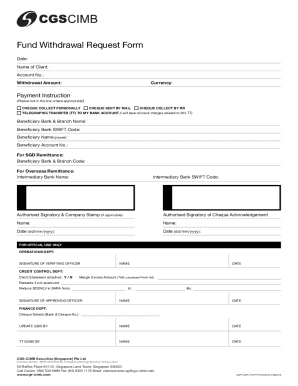
Fund Withdrawal Request Form Date: Name of Client: Account No.: Withdrawal Amount:Currency:Payment Instruction(Please tick in the box where appropriate) Check Collect personAllyCheque sent by mAilCheque.

How it works

  1. Open form

    Open form follow the instructions

  2. Easily sign form

    Easily sign the form with your finger

  3. Share form

    Send filled & signed form or save

How to fill out the SG CGS-CIMB Fund Withdrawal Request Form online

Completing the SG CGS-CIMB Fund Withdrawal Request Form online is a straightforward process that allows users to efficiently initiate their fund withdrawal requests. This guide provides step-by-step instructions to ensure that all sections are filled out correctly and submitted with ease.

Follow the steps to complete the withdrawal request form online

  1. Click the ‘Get Form’ button to obtain the form and open it in your preferred editor.
  2. Enter the date clearly at the top of the form.
  3. Provide your name as the client in the designated field.
  4. Fill in your account number accurately to avoid processing delays.
  5. Indicate the amount you wish to withdraw in the withdrawal amount field.
  6. Select the currency for the withdrawal from the available options.
  7. Choose your preferred payment instruction by ticking the appropriate box: collect the cheque personally, have it sent by mail, or collected by a registered representative.
  8. If opting for a telegraphic transfer (TT), fill in the necessary bank account details, including beneficiary bank and branch name, SWIFT code, beneficiary name, and beneficiary account number. Remember to note that you will bear all related bank charges.
  9. For SGD remittance, also provide the beneficiary bank and branch code, and for overseas remittance, specify the intermediary bank name and SWIFT code if applicable.
  10. Complete the section for the authorized signatory and include a company stamp if required.
  11. Both you and the authorized signatory should sign and date the form where indicated.
  12. After filling in all necessary sections, review your form for accuracy.
  13. Once confirmed, you can save your changes, download a copy, print it, or share the form as needed.

Begin the process of completing your documents online today.

Get form

Experience a faster way to fill out and sign forms on the web. Access the most extensive library of templates available.
Get form

Related content

STATE OF CONNECTICUT
Jan 26, 2023 — Overall, the Treasurer maintains an accurate account of all funds through...
Learn more
Sustainable Palm Oil: Trade and key players...
Part 1 of this report provides a baseline mapping study of Indonesia-China sustainable...
Learn more
COMPREHENSIVE - NYC.gov
Dec 21, 2022 — FINANCIAL | Part II. 13. • Report of Independent Certified Public...
Learn more

Related links form

Lged Map Provisional Selection For Redundancy Letter By Email Form Pcar Part 5 Nadogradnja I Odrzavanje PC Racunara - Knjizara.com

Questions & Answers

Get answers to your most pressing questions about US Legal Forms API.

Contact support

Trade with Clicks Trader via CIMB Clicks and enjoy online trading conveniences to help you grow your investments. We charge a brokerage fee* of just 0.0388% or RM8. 88, whichever is higher, when you trade online via CIMB Clicks. Enjoy a trading limit of 1x cash value, including the sales value of your shares.

We charge a brokerage fee* of just 0.0388% or RM8. 88, whichever is higher, when you trade online via CIMB Clicks. Enjoy a trading limit of 1x cash value, including the sales value of your shares.

You can only begin trading after your account has been approved by CGS-CIMB Securities Sdn Bhd and after depositing the required collateral deposit into your Trust Account. Do I need to place any minimum deposits? No minimun deposit is required.

(1) Kindly ensure that all outstanding payments and all holdings are cleared before closure. (2) Cheque will be ready for collection after 2.30pm the next day for instructions received on or before 6pm (excluding weekends and public holiday). Note: Please sign as per your records with CGS-CIMB Securities.

You can only begin trading after your account has been approved by CGS-CIMB Securities Sdn Bhd and after depositing the required collateral deposit into your Trust Account. Do I need to place any minimum deposits? No minimun deposit is required.

Interest on MYR trust account is 1.0% p.a.. 4. Clients who do not generate the required minimum day end turnover and/or maintain the minimum day end trust balance, brokerage fees of 0.42% or minimum RM28 will be applied.

Brokers Comparison BrokerOnline Brokerage FeesRHB1. 0.42% 2. Minimum: RM12RHB TradeSmart1. 0-100k: 0.42% 2. >100k: 0.21% 3. Intraday: 0.15% 4. Minimum: RM28SJ Securities1. 0-100k: 0.42% 2. >100k: 0.35% 3. Intraday: 0.15% 4. Minimum: RM12 5. Cash upfront: negotiable14 more rows

Instruction to withdraw cash Please contact to your Dealer's Representative. Email the instruction to us at customerservice.my@cgs-cimb.com. Indicate your name, trading account number, amount to withdraw and Bank account name and number.

Get This Form Now!

Use professional pre-built templates to fill in and sign documents online faster. Get access to thousands of forms.
Get form
If you believe that this page should be taken down, please follow our DMCA take down processhere.
Get SG CGS-CIMB Fund Withdrawal Request Form
Get form
  • Adoption
  • Bankruptcy
  • Contractors
  • Divorce
  • Home Sales
  • Employment
  • Identity Theft
  • Incorporation
  • Landlord Tenant
  • Living Trust
  • Name Change
  • Personal Planning
  • Small Business
  • Wills & Estates
  • Packages A-Z
  • Affidavits
  • Bankruptcy
  • Bill of Sale
  • Corporate - LLC
  • Divorce
  • Employment
  • Identity Theft
  • Internet Technology
  • Landlord Tenant
  • Living Wills
  • Name Change
  • Power of Attorney
  • Real Estate
  • Small Estates
  • Wills
  • All Forms
  • Forms A-Z
  • Other Templates
  • Legal Hub
  • About Us
  • Help Portal
  • Legal Resources
  • Blog
  • Affiliates
  • Contact Us
  • Delete My Account
  • Site Map
  • Industries
  • Forms in Spanish
  • Localized Forms
  • State-specific Forms
  • Forms Kit
  • Real Estate Handbook
  • All Guides
  • Notarize
  • Incorporation services
  • For Consumers
  • For Small Business
  • For Attorneys
  • USLegal
  • FormsPass
  • pdfFiller
  • signNow
  • altaFlow
  • DocHub
  • Instapage
Form Packages
  • Adoption
  • Bankruptcy
  • Contractors
  • Divorce
  • Home Sales
  • Employment
  • Identity Theft
  • Incorporation
  • Landlord Tenant
  • Living Trust
  • Name Change
  • Personal Planning
  • Small Business
  • Wills & Estates
  • Packages A-Z
Form Categories
  • Affidavits
  • Bankruptcy
  • Bill of Sale
  • Corporate - LLC
  • Divorce
  • Employment
  • Identity Theft
  • Internet Technology
  • Landlord Tenant
  • Living Wills
  • Name Change
  • Power of Attorney
  • Real Estate
  • Small Estates
  • Wills
  • All Forms
  • Forms A-Z
  • Other Templates
Customer Service
  • Legal Hub
  • About Us
  • Help Portal
  • Legal Resources
  • Blog
  • Affiliates
  • Contact Us
  • Delete My Account
  • Site Map
  • Industries
  • Forms in Spanish
  • Localized Forms
  • State-specific Forms
  • Forms Kit
Legal Guides
  • Real Estate Handbook
  • All Guides
Prepared for you
  • Notarize
  • Incorporation services
Our Customers
  • For Consumers
  • For Small Business
  • For Attorneys
Our Sites
  • USLegal
  • FormsPass
  • pdfFiller
  • signNow
  • altaFlow
  • DocHub
  • Instapage
Social Media
Call us now toll free:
+1 833 426 79 33
As seen in:
© Copyright 1999-2026 airSlate Legal Forms, Inc. 17 Station Street, Ste. 203, Brookline, MA 02445
  • Your Privacy Choices
  • Terms of Service
  • Privacy Notice
  • Content Takedown Policy
  • Bug Bounty Program