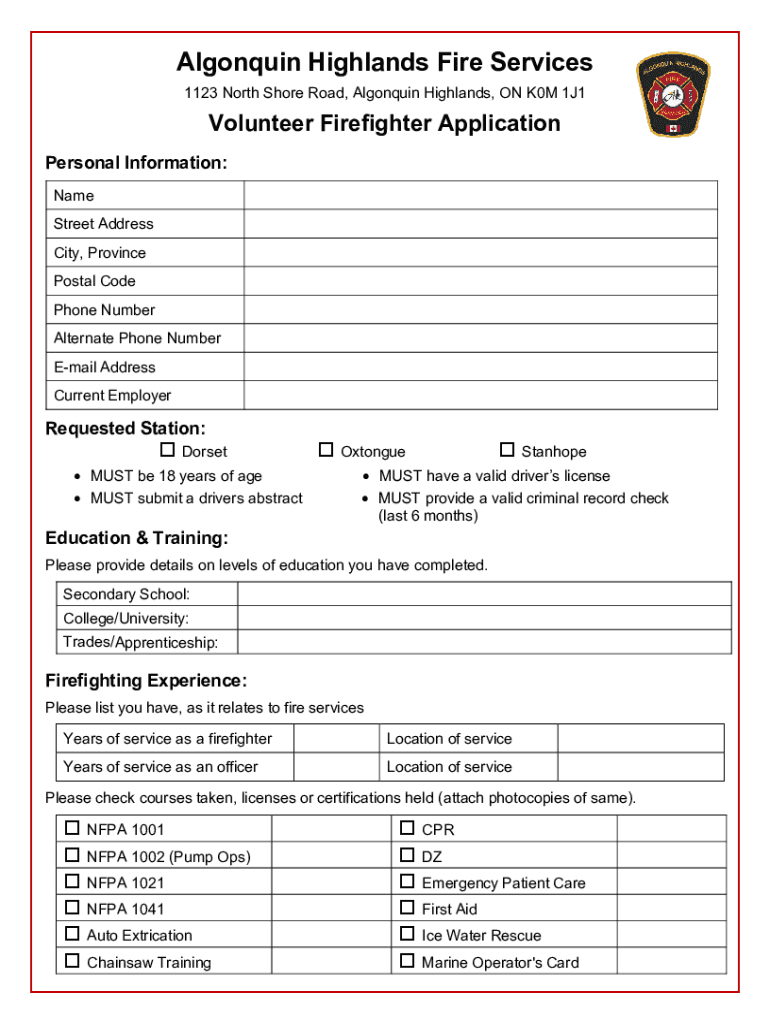
Algonquin Highlands Fire Services 1123 North Shore Road, Algonquin Highlands, ON K0M 1J1Volunteer Firefighter Application Personal Information: Name Street Address City, Province Postal Code Phone.
Loading

Open form follow the instructions

Easily sign the form with your finger

Send filled & signed form or save
How to fill out the Canada Algonquin Highlands Fire Services Volunteer Firefighter Application online
Filling out the Canada Algonquin Highlands Fire Services Volunteer Firefighter Application online is a straightforward process. This guide will walk you through each section and field of the application, ensuring you understand how to provide the necessary information accurately.
Follow the steps to complete your application online
- Click ‘Get Form’ button to obtain the form and open it in the editor.
- In the personal information section, enter your name, street address, city, province, postal code, phone number, alternate phone number, email address, and current employer.
- Indicate the requested station by checking either Dorset or Oxtongue. Remember that you must be 18 years of age and submit a driver's abstract.
- Provide information about your education and training. Fill in the details of your completed levels of education, including secondary school, college/university, and trades/apprenticeship.
- In the firefighting experience section, list your years of service as a firefighter and the location of your service. Also, include any years of service as an officer along with the relevant location.
- Check all courses taken, licenses, or certifications held. Attach photocopies of certifications, such as NFPA standards and first aid training.
- In the medical information section, disclose any medical or physical conditions that could limit your ability as a firefighter.
- Use the other information section to share any relevant details about yourself, such as interests, skills, or motivations for volunteering.
- Complete the references section by providing names, relationships to you, phone numbers, and email addresses for three references.
- In the agreement and signature section, confirm that the information provided is accurate and sign, date, and provide your printed name.
- Finally, submit your completed application via email or mail it to the Fire Chief at the specified address. Make sure to save the changes to your document.
Start filling out your application online today.
Experience a faster way to fill out and sign forms on the web. Access the most extensive library of templates available.
Related content
Dec 15, 2022 — Federal Excess Personal Property and Firefighter Property Program...
Please enter your information into the form below. If you have taken a class with IFSI...
Weber offers a complete line of label- ing and coding equipment, all designed for easy...
Use professional pre-built templates to fill in and sign documents online faster. Get access to thousands of forms.
If you believe that this page should be taken down, please follow our DMCA take down process here.