Loading
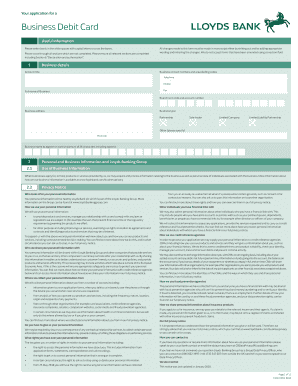
Get Uk Lloyds Bank 7182 2018
How it works
-

Open form follow the instructions
-

Easily sign the form with your finger
-

Send filled & signed form or save
How to fill out the UK Lloyds Bank 7182 online
The UK Lloyds Bank 7182 form is essential for businesses applying for a Business Debit Card. This guide will provide clear and supportive instructions on how to complete the form accurately and efficiently.
Follow the steps to successfully fill out the UK Lloyds Bank 7182
- Click the ‘Get Form’ button to obtain the UK Lloyds Bank 7182 and open it in your online editor.
- Fill out the 'Business details' section, including the account title, contact numbers, full name of the business, branch sort code, and account number. Clearly indicate the business type and complete the business address.
- In the 'Business name to appear on card' field, provide the desired name, ensuring it does not exceed 26 characters including spaces.
- Complete section 2.1 to include 'Personal and Business Information' and ensure that you review the privacy information about how Lloyds Bank processes your data.
- Proceed to section 3, detailing 'Authorised Users'. Enter the names and contact details of individuals who are permitted to use the Business Debit Card.
- For each Authorised User, include their surname, first name(s), contact details, date of birth, and position held in the business. Ensure they understand the terms of use as stated.
- Complete the 'Declaration and authorisation' section, where signatories from the business must confirm their agreement to the terms and conditions laid out in the application.
- Review the entire form for any missing information and ensure all changes have been manually initialed. Once completed, you can save changes, download, print, or share the form as needed.
Start filling out the UK Lloyds Bank 7182 online today to streamline your business banking.
Get form
Experience a faster way to fill out and sign forms on the web. Access the most extensive library of templates available.
Get This Form Now!
Use professional pre-built templates to fill in and sign documents online faster. Get access to thousands of forms.