Loading
Form preview
  • US Legal Forms
  • Other Templates
  • More Forms
  • More Multi-State Forms
  • Sc Mechanical Permit Application For Commercial - Greenville County 2019

Get Sc Mechanical Permit Application For Commercial - Greenville County 2019-2026

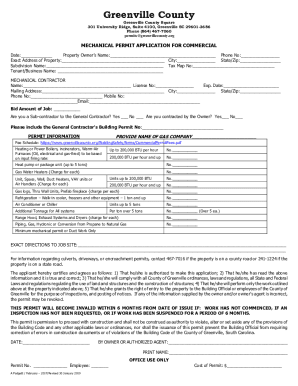
Greenville County Square 301 University Ridge, Suite 4100, Greenville SC 296013686 Phone (864) 4677060 permits greenvillecounty.mechanical PERMIT APPLICATION FOR COMMERCIAL Date: Property Owners.

How it works

  1. Open form

    Open form follow the instructions

  2. Easily sign form

    Easily sign the form with your finger

  3. Share form

    Send filled & signed form or save

How to fill out the SC Mechanical Permit Application For Commercial - Greenville County online

Filling out the SC Mechanical Permit Application for Commercial in Greenville County online can streamline the process of obtaining necessary permits for your mechanical work. This guide provides step-by-step instructions to help users accurately complete the application.

Follow the steps to successfully complete your application.

  1. Click 'Get Form' button to obtain the form and open it for editing.
  2. Enter the current date in the designated field at the top of the application.
  3. Fill in the property owner's name and phone number accurately.
  4. Provide the exact address of the property, ensuring to include the city and state/zip code.
  5. If applicable, include the subdivision name and tax map number.
  6. Input the tenant or business name into the appropriate field.
  7. For the mechanical contractor section, supply the contractor’s name, license number, and expiration date.
  8. Include the mailing address, city, state/zip, phone number, mobile number, and email of the contractor.
  9. Indicate the bid amount of the job and specify if the contractor is a subcontractor to the general contractor or contracted by the owner.
  10. List the general contractor’s building permit number if applicable.
  11. Provide the name of the gas company associated with the project.
  12. Fill in the permit information including the fee schedule according to the type of mechanical installations, like heating units, water heaters, and refrigeration.
  13. Write exact directions to the job site to ensure accurate inspections.
  14. Read and certify the applicant’s agreement regarding the responsibility and conditions stated in the form.
  15. Provide the name of the owner or authorized agent and their signature.
  16. Once all fields are completed and verified, save changes, and choose to download, print, or share the completed application.

Complete your SC Mechanical Permit Application online today for a more efficient process.

Get form

Experience a faster way to fill out and sign forms on the web. Access the most extensive library of templates available.
Get form

Related content

Forms / Applications - County of Greenville, SC
Electrical Permit Application (Electrical Only); Mechanical Permit Application For...
Learn more
§ 14-16-3-5 GENERAL SIGN REGULATIONS. (A) Zoning...
(g) A permit for a new off-premise sign will be approved only upon removal of an existing...
Learn more
Mechanical Permit Application for Commercial
301 University Ridge, Suite 4100, Greenville SC 29601-3686. Phone (864) 467-7060...
Learn more

Related links form

CA Blue Shield Prior Authorization Request Form Genetic Testing IN Spine Group Patient Registration Forms Package 2019 UCLA Health Form 16095 2016 Purdue University Form CF 754 2019

Questions & Answers

Get answers to your most pressing questions about US Legal Forms API.

Contact support

$1,000 and less No fee, unless inspection required, in which case a $15 fee for each inspection shall be charged $1,000 to $50,000 $15 for the first $1,000 plus $5 for each additional thousand or fraction thereof, to and including $50,000 $50,000 to $100,000 $260 for the first $50,000 plus $4 for each additional ...

Conditional Use permits are required for businesses that would like to be open after midnight, and uses such as bars, nightclubs and event venues. Applications for Conditional Use permits require review and recommendation by the City's Technical Advisory Committee (TAC) prior to approval.

City code says any owner or owner's authorized agent who intends to construct, enlarge, alter, repair, move, demolish or change the occupancy of a building or structure, or to erect, , enlarge, alter, repair, remove, convert or replace any electrical, gas, mechanical or plumbing system, the installation of which ...

How do I apply for a permit? A completed permit application must be submitted to the permit office by email permits@greenvillecounty.org or in person . All permit applications require either the tax map number or an active permit number for the site.

If your shed is smaller than 200 sq. ft., the building permit requirements are voided. However, before starting your project, you will still need to submit an application and have it approved by your local municipality.

The average processing time for a residential building permit is approximately 5 to 7 business day, excluding holidays. Most commercial building permit applications with a General Contractor identified on the application are processed in approximately 15 business days, excluding holidays.

PERMIT APPLICATION FEE A non-refundable permit application of $40.00 is required for all building and trade permits.

Any new construction, addition or alteration of existing residential or commercial structures, structural changes, commercial tenants, construction trailer, tents, kiosk (sales, fireworks, Christmas trees) swimming pools, shed, signage, manufactured home, plumbing; public or private sewage, and all electrical, gas or ...

Get This Form Now!

Use professional pre-built templates to fill in and sign documents online faster. Get access to thousands of forms.
Get form
If you believe that this page should be taken down, please follow our DMCA take down processhere.
Get SC Mechanical Permit Application For Commercial - Greenville County
Get form
  • Adoption
  • Bankruptcy
  • Contractors
  • Divorce
  • Home Sales
  • Employment
  • Identity Theft
  • Incorporation
  • Landlord Tenant
  • Living Trust
  • Name Change
  • Personal Planning
  • Small Business
  • Wills & Estates
  • Packages A-Z
  • Affidavits
  • Bankruptcy
  • Bill of Sale
  • Corporate - LLC
  • Divorce
  • Employment
  • Identity Theft
  • Internet Technology
  • Landlord Tenant
  • Living Wills
  • Name Change
  • Power of Attorney
  • Real Estate
  • Small Estates
  • Wills
  • All Forms
  • Forms A-Z
  • Other Templates
  • Legal Hub
  • About Us
  • Help Portal
  • Legal Resources
  • Blog
  • Affiliates
  • Contact Us
  • Delete My Account
  • Site Map
  • Industries
  • Forms in Spanish
  • Localized Forms
  • State-specific Forms
  • Forms Kit
  • Real Estate Handbook
  • All Guides
  • Notarize
  • Incorporation services
  • For Consumers
  • For Small Business
  • For Attorneys
  • USLegal
  • FormsPass
  • pdfFiller
  • signNow
  • altaFlow
  • DocHub
  • Instapage
Form Packages
  • Adoption
  • Bankruptcy
  • Contractors
  • Divorce
  • Home Sales
  • Employment
  • Identity Theft
  • Incorporation
  • Landlord Tenant
  • Living Trust
  • Name Change
  • Personal Planning
  • Small Business
  • Wills & Estates
  • Packages A-Z
Form Categories
  • Affidavits
  • Bankruptcy
  • Bill of Sale
  • Corporate - LLC
  • Divorce
  • Employment
  • Identity Theft
  • Internet Technology
  • Landlord Tenant
  • Living Wills
  • Name Change
  • Power of Attorney
  • Real Estate
  • Small Estates
  • Wills
  • All Forms
  • Forms A-Z
  • Other Templates
Customer Service
  • Legal Hub
  • About Us
  • Help Portal
  • Legal Resources
  • Blog
  • Affiliates
  • Contact Us
  • Delete My Account
  • Site Map
  • Industries
  • Forms in Spanish
  • Localized Forms
  • State-specific Forms
  • Forms Kit
Legal Guides
  • Real Estate Handbook
  • All Guides
Prepared for you
  • Notarize
  • Incorporation services
Our Customers
  • For Consumers
  • For Small Business
  • For Attorneys
Our Sites
  • USLegal
  • FormsPass
  • pdfFiller
  • signNow
  • altaFlow
  • DocHub
  • Instapage
Social Media
Call us now toll free:
+1 833 426 79 33
As seen in:
© Copyright 1999-2026 airSlate Legal Forms, Inc. 17 Station Street, Ste. 203, Brookline, MA 02445
  • Your Privacy Choices
  • Terms of Service
  • Privacy Notice
  • Content Takedown Policy
  • Bug Bounty Program