Loading
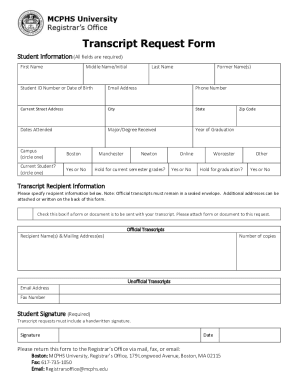
Get Mcphs University Registrar's Office Transcript Request Form 2021
How it works
-

Open form follow the instructions
-

Easily sign the form with your finger
-

Send filled & signed form or save
How to fill out the MCPHS University Registrar's Office Transcript Request Form online
This guide provides a detailed overview of how to complete the MCPHS University Registrar's Office Transcript Request Form online. It is designed to assist users in providing accurate information to ensure a smooth processing of their transcript requests.
Follow the steps to complete your online transcript request.
- Click ‘Get Form’ button to access the form and open it in the editor.
- Begin by filling out your student information. All fields are required. Start with your first name, followed by your middle name or initial if applicable, and your last name. If you have any former names, include those as well.
- Enter your student ID number or date of birth, ensuring that this information is accurate. Provide your email address and phone number for contact purposes.
- Input your current street address, city, state, and zip code. This is essential for any correspondence regarding your transcript.
- Specify the dates you attended MCPHS University, your major or degree received, and your year of graduation. Additionally, select your campus by circling the appropriate option: Boston, Manchester, Newton, Worcester, or Other.
- Indicate if you are a current student by circling ‘Yes’ or ‘No’. Next, specify whether you would like the transcript to be held for current semester grades by also circling ‘Yes’ or ‘No’.
- Decide if you want your transcript to be held for graduation by circling ‘Yes’ or ‘No’.
- In the transcript recipient information section, provide the names and mailing addresses for the individuals or organizations that should receive your transcript. Note that official transcripts must remain in a sealed envelope.
- If you require additional copies, indicate the number you wish to receive. For unofficial transcripts, include the recipient's email address and fax number if necessary.
- After completing all the necessary fields, provide a handwritten signature in the space allocated. Include the date the form is filled out.
- Finally, return the completed form to the Registrar’s Office. You can submit it via mail, fax, or email, as specified in the instructions provided.
Complete your transcript request online today for efficient processing of your academic records.
Get form
Experience a faster way to fill out and sign forms on the web. Access the most extensive library of templates available.
Get This Form Now!
Use professional pre-built templates to fill in and sign documents online faster. Get access to thousands of forms.