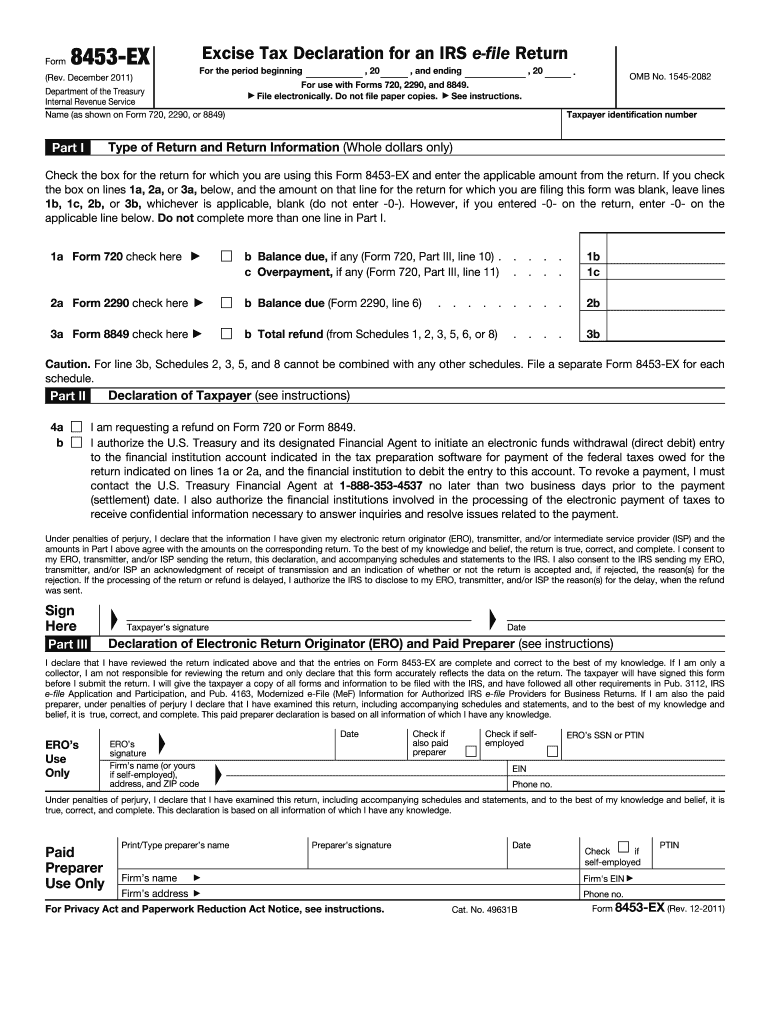
Only) Part I Check the box for the return for which you are using this Form 8453-EX and enter the applicable amount from the return. If you check the box on lines 1a, 2a, or 3a, below, and the amount on that line for the return for which you are filing this form was blank, leave lines 1b, 1c, 2b, or 3b, whichever is applicable, blank (do not enter -0-). However, if you entered -0- on the return, enter -0- on the applicable line below. Do not complete more than one line in Part I. 1a Form 720.
Loading

Open form follow the instructions

Easily sign the form with your finger

Send filled & signed form or save
How to fill out the IRS 8453-EX online
Filling out the IRS 8453-EX is an important step for ensuring your electronic excise tax returns are filed accurately. This guide will walk you through each section of the form to help you complete it correctly and efficiently.
Follow the steps to successfully complete the IRS 8453-EX form online.
- Click ‘Get Form’ button to obtain the form and open it for editing.
- Enter your name as it appears on Forms 720, 2290, or 8849 in the designated field.
- Input your taxpayer identification number where indicated on the form.
- In Part I, check the box corresponding to the return you are submitting. Enter the applicable amounts from your return in the specified lines below the boxes.
- Proceed to Part II and check the box if you are requesting a refund. If you are authorizing electronic payment, ensure you provide the necessary banking details in your tax preparation software.
- Sign and date the form in Part III to declare the information is correct to the best of your knowledge.
- If applicable, have your electronic return originator (ERO) complete their information and declaration in Part III.
- After completing all fields, save your changes and ensure the form is in PDF format, ready for electronic submission with your return.
Complete your IRS forms online today to ensure timely processing and compliance.
Experience a faster way to fill out and sign forms on the web. Access the most extensive library of templates available.
Related content
Nov 1, 2022 — Form 8453-EX is used to authenticate an electronic excise tax return or...
Apr 16, 2012 — This Thirteenth report describes the experience, struc- ture, and...
Dec 15, 2016 — Form 1040, line 21 (Schedule C or C-EZ for professional gamblers)...
Get answers to your most pressing questions about US Legal Forms API.
When must a form 8453 be submitted to the IRS after acceptance of an e filed return?
If you are an ERO, you must mail Form 8453 to the IRS within 3 business days after receiving acknowledgement that the IRS has accepted the electronically filed tax return.
Do I have to send form 8453 to IRS?
If you are filing your tax return using an online provider, mail Form 8453 to the IRS within 3 business days after you have received acknowledgement from your intermediate service provider and/or transmitter that the IRS has accepted your electronically filed tax return.
What is IRS form 8453 EX?
About Form 8453-EX, Excise Tax Declaration for an IRS e-file Return | Internal Revenue Service.
What is the difference between IRS form 8453 and 8879?
If the taxpayer is signing the electronically filed return by using a PIN, use Form 8879, California e-file Signature Authorization for Individuals. If the taxpayer is signing the return via handwritten signature, use Form 8453, California e-file Return Authorization for Individuals.
What to include with 8453?
Acceptable attachments to Form 8453 include Form 1098-C Contributions of Motor Vehicles, Boats and Airplanes. Form 2848 Power of Attorney and Declaration of Representative. Form 3115 Application for Change in Accounting Method. Form 3468 Investment Credit. Form 4136 Credit for Federal Tax Paid on Fuels.
What is 8453 tax form?
About Form 8453, U.S. Individual Income Tax Transmittal for an IRS e-file Return | Internal Revenue Service.
What is the difference between 8453 and 8879?
If the taxpayer is signing the electronically filed return by using a PIN, use Form 8879, California e-file Signature Authorization for Individuals. If the taxpayer is signing the return via handwritten signature, use Form 8453, California e-file Return Authorization for Individuals.
Use professional pre-built templates to fill in and sign documents online faster. Get access to thousands of forms.
If you believe that this page should be taken down, please follow our DMCA take down process here.