Loading
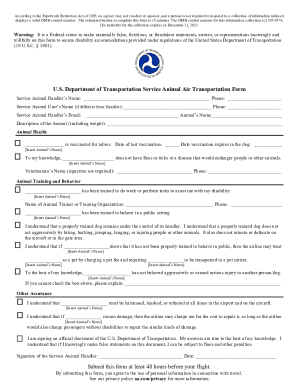
Get Dot Service Animal Air Transportation Form 2020
How it works
-

Open form follow the instructions
-

Easily sign the form with your finger
-

Send filled & signed form or save
How to fill out the DoT Service Animal Air Transportation Form online
This guide provides clear and comprehensive instructions on how to complete the DoT Service Animal Air Transportation Form online. We aim to support you through each step, ensuring a smooth experience as you prepare for air travel with your service animal.
Follow the steps to complete the form accurately and efficiently.
- Click the 'Get Form' button to access the document. This action will allow you to download and open the form for editing.
- Begin by filling out the service animal handler’s name and phone number in the designated fields. If the service animal user is different from the handler, please provide their name and contact information as well.
- Enter the service animal handler's email address and the animal's name. Make sure these details are correct to ensure proper communication.
- In the 'Description of the Animal' section, provide a thorough description of your service animal, including its weight. This information may be necessary for the airline’s records.
- Under 'Animal Health', confirm the vaccination status for rabies by checking the relevant box and entering the last vaccination date and the expiry date. You must also affirm that your animal does not have fleas, ticks, or any diseases that could pose a risk.
- In the 'Animal Training and Behavior' section, verify that your service animal has been specifically trained to assist you with your disability and in public settings. Provide the name of the trainer or training organization and their contact number.
- Acknowledge and initial the statements regarding your service animal’s behavior and the responsibilities of keeping the animal under control. Make sure to reflect your understanding of the airline's policies regarding service animals.
- Complete the 'Other Assurance' section by confirming your agreement to harness, leash, or tether your animal at all times and acknowledge any potential costs for damage caused by your animal.
- Sign and date the form, ensuring that you confirm the accuracy of all information provided. It's essential to understand that making false statements may result in penalties.
- Finally, submit this form at least 48 hours before your scheduled flight to ensure all arrangements are made. After filling out the form, you can save your changes, and download, print, or share it as needed.
Complete your DoT Service Animal Air Transportation Form online today to ensure a smooth journey with your service animal.
Get form
Experience a faster way to fill out and sign forms on the web. Access the most extensive library of templates available.
If airline personnel are not certain of the animal's status, even after being told that an animal is a service animal, additional questions may be asked, including: What tasks or functions does your animal perform for you? What has the animal been trained to do for you?
Get This Form Now!
Use professional pre-built templates to fill in and sign documents online faster. Get access to thousands of forms.