Loading
Get Canada Rc193 E 2018
How it works
-

Open form follow the instructions
-

Easily sign the form with your finger
-

Send filled & signed form or save
How to fill out the Canada RC193 E online
Filing a service-related complaint with the Canada Revenue Agency can be a crucial step in resolving your issues. This guide provides a clear, step-by-step approach to completing the Canada RC193 E form online, ensuring you provide all necessary information effectively.
Follow the steps to complete your service-related complaint form online.
- Click ‘Get Form’ button to access the Canada RC193 E and open it in your preferred browser.
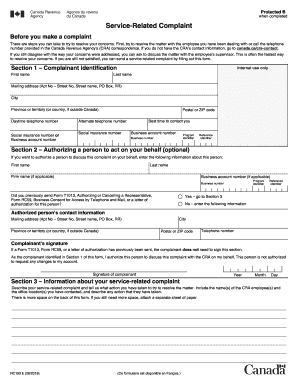
- In Section 1, provide your identification details. Enter your last name and first name, followed by your mailing address, including any apartment number, street number, street name, or P.O. Box. Make sure to select the correct city, province or territory, and postal code. Provide your daytime telephone number, social insurance number or business account number, and indicate your preferred time for contact.
- Complete Section 2 if you wish to authorize another person to act on your behalf. Enter the individual's first and last name, firm name if applicable, and their corresponding business account number and program identifier. You'll also need to state if you have previously sent any authorization forms. If not, fill in their contact information, including their mailing address, city, province, postal code, and telephone number.
- Section 3 requires you to describe your service-related complaint comprehensively. Clearly state the actions you took to address the issue, including names of CRA employees you interacted with and their office locations. Use the additional space provided on the back of the form or attach a separate sheet if necessary.
- If you've previously submitted a Form T1013 or Form RC59, you do not need to sign Section 2. If signing, ensure you include the date (year, month, day) of your signature. Review all the information provided to confirm its accuracy.
- Once you have completed the form, you can save your changes, download the form for your records, and print it if necessary. Be sure to follow the directions for submitting the form, either online, by fax, or by mail.
Complete the Canada RC193 E form online today to address your service-related complaints efficiently.
Get form
Experience a faster way to fill out and sign forms on the web. Access the most extensive library of templates available.
Get This Form Now!
Use professional pre-built templates to fill in and sign documents online faster. Get access to thousands of forms.