Loading
Get Canada Royal Bc Museum Permissions Form 2007-2026
How it works
-

Open form follow the instructions
-

Easily sign the form with your finger
-

Send filled & signed form or save
How to fill out the Canada Royal BC Museum Permissions Form online
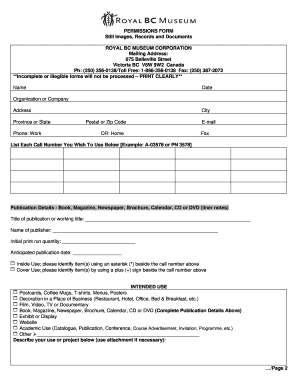
This guide provides clear, step-by-step instructions for users looking to fill out the Canada Royal BC Museum Permissions Form online. Whether you are a researcher, educator, or creative, this form allows you to obtain permission to use the museum's still images, records, and documents.
Follow the steps to complete the permissions form accurately.
- Press the ‘Get Form’ button to access the permissions form and open it in the editor.
- Begin by entering your name in the designated field. Ensure that it is printed clearly.
- Input the date in the next field.
- Fill in the name of your organization or company, along with your complete mailing address, including province or state.
- Provide your phone number in the designated work or home phone fields, and include your email address.
- List each call number you wish to use in the specified section. Use the provided example for clarity.
- Describe the publication details, such as the title, publisher's name, print run quantity, and anticipated publication date.
- Select your intended use from the options provided, marking with an asterisk (*) or plus (+) as instructed.
- Detail your project or use in the space provided. Attach additional documentation if necessary.
- Acknowledge the conditions of use and ensure compliance with the copyright act, as stated in the form.
- Sign and date the form at the bottom, indicating your agreement to the terms.
- After completing the form, save your changes. You may download, print, or share the form as needed.
Complete your permissions form online today to gain access to valuable resources from the Royal BC Museum.
The Museum Act (2003) sets out the purposes, powers and governance of the Royal BC Museum, establishing it as a Crown corporation.