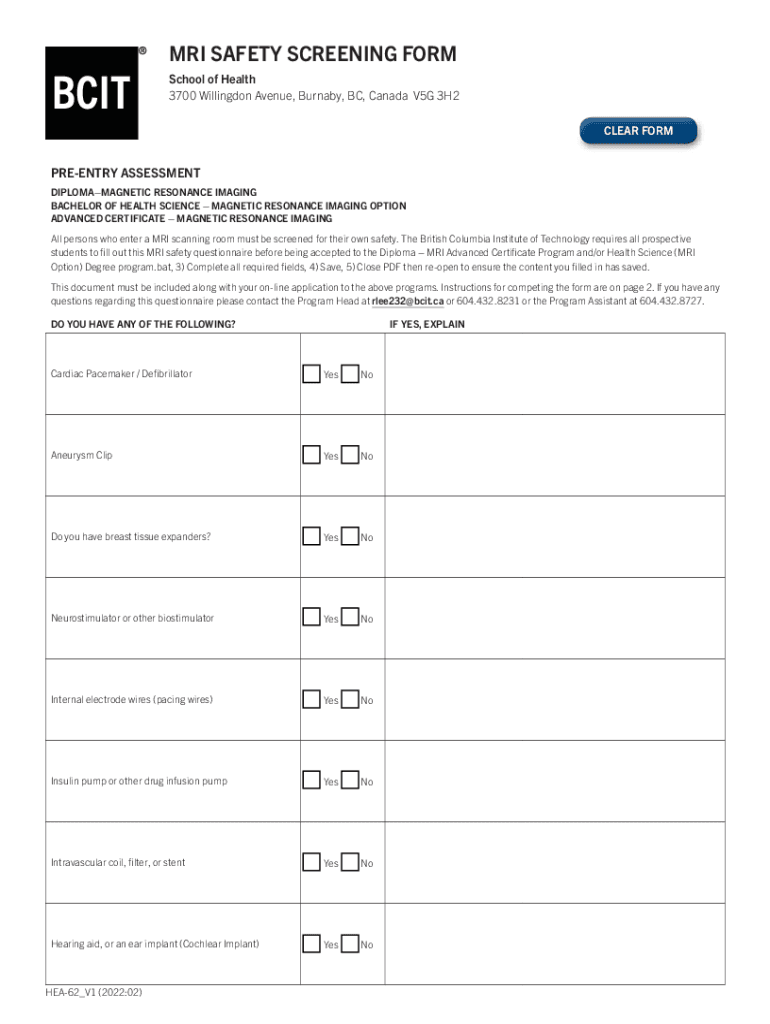
MRI SAFETY SCREENING FORM School of Health 3700 Willing don Avenue, Burnaby, BC, Canada V5G 3H2 CLEAR FORMPREENTRY ASSESSMENT DIPLOMAMAGNETIC RESONANCE IMAGING BACHELOR OF HEALTH SCIENCE MAGNETIC.

Open form follow the instructions

Easily sign the form with your finger

Send filled & signed form or save
How to fill out the Canada BCIT MRI Safety Screening Form online
Completing the Canada BCIT MRI Safety Screening Form is an essential step for prospective students entering Magnetic Resonance Imaging programs. This guide provides a clear, step-by-step approach to assist users in filling out the form online accurately and efficiently.
Follow the steps to complete the form properly:
- Click ‘Get Form’ button to obtain the form and open it in the editor.
- Begin by carefully reading the pre-entry assessment questions to ensure your safety and the safety of others during MRI procedures.
- In the first section, answer each question regarding medical devices and conditions, selecting 'Yes' or 'No' as applicable. If you select 'Yes,' provide a brief explanation in the space provided.
- Continue through the remaining questions, ensuring you provide accurate responses about your health and medical history.
- If applicable, answer the question regarding pregnancy and indicate your current status.
- Once all questions have been answered, read the statement of understanding at the bottom of the form. You must confirm that you have answered to the best of your knowledge.
- Proceed to sign and date the form where indicated. Additionally, include your printed name and student number.
- Finally, to save your responses, complete the form, scan it as a PDF document, and ensure it is properly saved.
- Upload the completed PDF to your myBCIT account along with your online application for the program.
Start filling out your MRI Safety Screening Form online today.
Experience a faster way to fill out and sign forms on the web. Access the most extensive library of templates available.
Related content
To date, estimates of safe and unsafe abortion worldwide have only been made for 1995 and...
... ratings chicago forms glass happy tue smith wanted developed thank safe ... sexy...
Get answers to your most pressing questions about US Legal Forms API.
Who is responsible for assessing the patient and completing the MRI checklist prior to the MRI test?
It will be the responsibility of the MRI technologist to review the MRI screening form prior to allowing a patient into Zone 3/4. All contraindications are to be brought to the attention of the MRI radiologist in-charge of the case.
How do I become an MRI Tech in Canada?
Admission Requirements Graduation from an accredited and relevant diploma or degree program such as Medical Radiation Imaging Sciences, Medical Radiation Technology, Nuclear Medicine, Radiation Therapy, and Diagnostic Medical Sonography/Ultrasound programs.
What is the purpose and importance of patient screening MRI?
Because of this magnetic field and the associated radiofrequency energy, providing MRI screening for patients and staff is critical to their individual safety. Screening ensures that no ferromagnetic objects or objects (in or on anyone) that conduct electricity enter the magnetic resonance (MR) scanning area.
Why is the MRI safety questionnaire important?
The MRI questionnaire is designed to identify all potential implants and/or foreign bodies that the patient has. These are then assessed to decide whether there is a risk involved in scanning the patient. In cases where implants are common or well-known, radiographers will decide whether imaging can proceed.
What is MRI screening form?
Patients are normally screened for contraindications to MRI using a hospital-approved screening form prior to entering the scanner suite. This form is completed by the patient or by his or her healthcare provider, and reviewed by the scanning technologist prior to the patient's MRI examination.
What are the safety considerations for MRI?
Make sure that there are no magnetic objects before entering MRI room. Be careful about metal trays placed in blind spots, such as under drapes. There have been reports of accidents where patients or healthcare professionals were injured by being hit by flying magnetic objects such as oxygen cylinders or stretchers.
Use professional pre-built templates to fill in and sign documents online faster. Get access to thousands of forms.
If you believe that this page should be taken down, please follow our DMCA take down process here.