Loading
Get Bm Bf&m Health Insurance Claim Form
How it works
-

Open form follow the instructions
-

Easily sign the form with your finger
-

Send filled & signed form or save
How to fill out the BM BF&M Health Insurance Claim Form online
Completing the BM BF&M Health Insurance Claim Form online can streamline the process of receiving reimbursement for medical expenses. This guide provides clear instructions for accurately filling out each section of the form to ensure a smooth submission.
Follow the steps to successfully complete your claim form.
- Click ‘Get Form’ button to obtain the claim form and open it in your preferred digital editor.
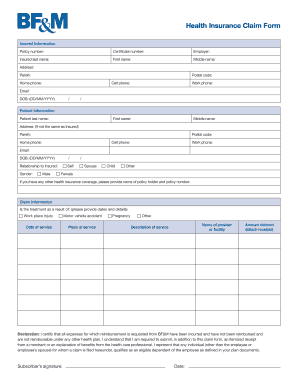
- Begin by filling out the insured information section. Provide the policy number and certificate number to identify the insurance coverage. Include the insured's last name, first name, middle name, and contact details, such as address, postal code, and phone numbers.
- Next, complete the patient information section. If the patient is the same as the insured, indicate this by marking the appropriate option. Otherwise, fill in the patient's last name, first name, middle name, address, and contact details. Include their relationship to the insured, gender, and date of birth.
- In the claim information section, specify whether the treatment was due to a workplace injury, motor vehicle accident, pregnancy, or other. Provide the date of service and place of service along with a detailed description of the service received.
- Provide the name of the healthcare provider or facility, and enter the amount claimed for reimbursement. Attach any necessary receipts to support your claim.
- Read through the declaration statement carefully. It certifies that the submitted expenses are the only claims being requested and that all relevant documents are included. The subscriber should sign and date the form after confirming the accuracy of the information provided.
- Finally, review all sections to ensure accuracy. Once confirmed, you can save changes, download the completed form, print it for your records, or share it as needed.
Complete your BM BF&M Health Insurance Claim Form online to facilitate prompt reimbursement for your medical expenses.
Cleaning a Botched BMBF Search for com.weloveoculus.bmbf.apk. Click the gear icon next to that package. Select UNINSTALL APP. Click CLOSE. Search for Beat Saber. Click the gear icon next to that package. Select BACKUP GAME DATA (eventually, we can restore this) Select UNINSTALL APP.