GEORGIA DEPARTMENT OF HUMAN SERVICES DIVISION OF FAMILY AND CHILDREN SERVICES Muskogee Countywide RE: Dear: Thank you for your concern regarding the children of Georgia and your compliance with.
Loading

Open form follow the instructions

Easily sign the form with your finger

Send filled & signed form or save
How to fill out the GA Child Protective Services Mandated Reporter Form online
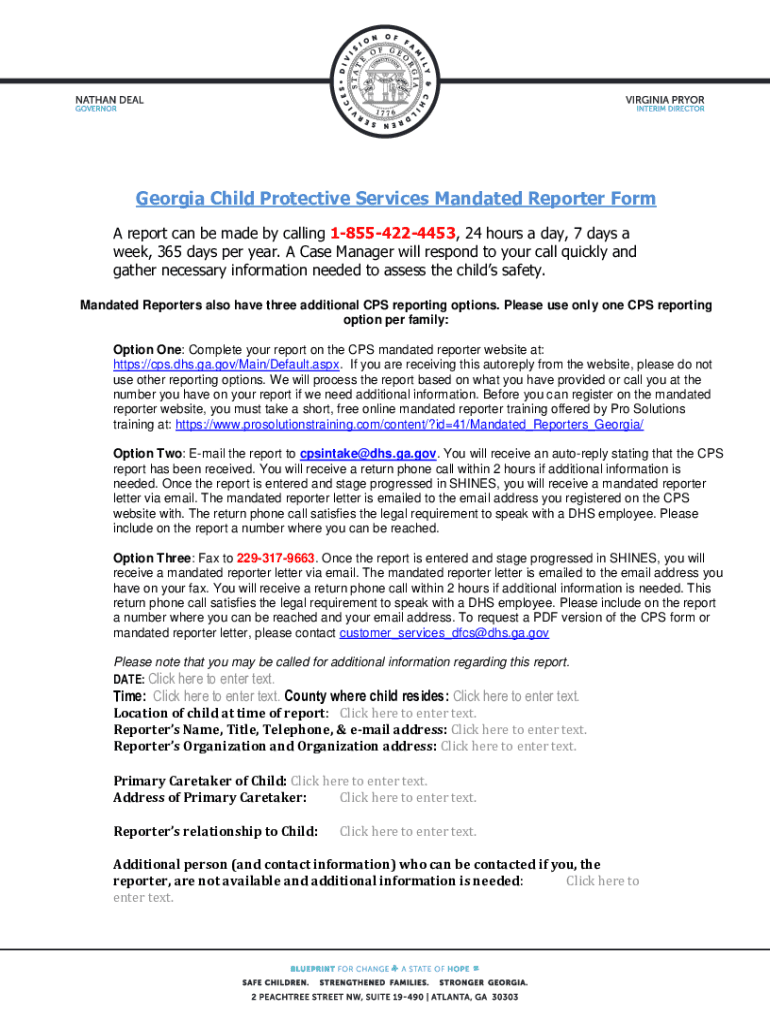
Filling out the GA Child Protective Services Mandated Reporter Form online is an important step in ensuring the safety of children. This guide provides clear instructions for each section of the form, making it accessible for all users, regardless of their legal experience.
Follow the steps to complete the form accurately.
- Click ‘Get Form’ button to obtain the form and open it in the designated editor.
- Begin by entering the date and time of the report. This helps establish a timeline for the concerns being reported.
- In the 'County where child resides' section, input the name of the county where the child currently lives. This is crucial for routing the report to the appropriate authorities.
- Next, specify the 'Location of child at time of report.' This information assists in understanding the current safety context of the child.
- Fill in your personal details under 'Reporter’s Name, Title, Telephone, & e-mail address.' Ensure accuracy for follow-up communication.
- Input the name and address of the 'Reporter’s Organization' if applicable. This identifies your role in relation to the child.
- Complete the 'Primary Caretaker of Child' section with the caretaker's name and address to help identify the child's primary support system.
- Indicate your relationship to the child clearly in the designated section. This provides context for your report.
- If applicable, provide information for an additional person who can be contacted if you are unavailable, including their contact information.
- Include the name and contact information of the primary staff-person in your organization who has firsthand knowledge of the situation. This is critical for thorough assessments.
- Enter details about the child's family, including names, races, social security numbers, dates of birth, employment information, and marital statuses to create a comprehensive profile.
- For each child involved, provide their name, sex, race, date of birth, social security number, and grade level to ensure proper identification.
- Complete the section for other household members, detailing their relationships to the primary caretaker, languages spoken, marital statuses, races, dates of birth, and social security numbers.
- In the final descriptive sections, provide detailed information about what happened, your observations, and the context surrounding the incident. Clarity and detail are essential in these responses.
- Once you have thoroughly completed all sections, review your entries for accuracy, then save, download, print, or share the form as needed.
Complete the GA Child Protective Services Mandated Reporter Form online today to help protect children in your community.
Experience a faster way to fill out and sign forms on the web. Access the most extensive library of templates available.
Related content
Prevent Child Abuse (PCA) of GA also offers in-person training. ... It is intended that...
Do you know how to recognize and report chid abuse or neglect? It's our job as adults to...
CONSENT FOR SERVICES; CHILDREN FOURTEEN YEARS OF AGE OR ... (d) A physician who suspects...
Get answers to your most pressing questions about US Legal Forms API.
What is child abuse and neglect? How does my state define ...
Any recent act or failure to act on the part of a parent or caretaker, which results in death, serious physical or emotional harm, sexual abuse or exploitation, or an act or failure to act which presents an imminent risk of serious harm.
When should a mandated reporter report abuse?
A mandated reporter is one who is required by law to report reasonable suspicions of abuse. When should I make a report? Most state law indicates that a report should be made when there is reason to believe that a child has been abused, is being abused, or is in danger of being abused.
Do mandatory reporters have to report past abuse?
When should you report past child sexual abuse? ... In NSW, doctors must make a mandatory report if there is an identifiable class of children at risk of significant harm, such as when an adult patient reports that they know an alleged offender continues to have contact with children, for example through their occupation.
What is not considered abuse?
Physical discipline from a parent that does not injure or impair a child is not considered abuse; however non-violent alternatives are always available.
What are the 5 abuses?
Physical abuse. Domestic violence or abuse. Sexual abuse. Psychological or emotional abuse. Financial or material abuse. Modern slavery. Discriminatory abuse. Organisational or institutional abuse.
What is a Mandated Reporter? - Social Work Degree Guide
A mandated reporter is a person who, because of his or her profession, is legally required to report any suspicion of child abuse or neglect to the relevant authorities. These laws are in place to prevent children from being abused and to end any possible abuse or neglect at the earliest possible stage.
What CPS consider abuse?
These services are available to children and their families when children are victims of, or at risk of, abuse, neglect, exploitation, or parental absence. California law defines child abuse as any of the following: A child is physically injured by other than accidental means. ... A child is abused or exploited sexually.
What is legally considered abuse?
1) Abuse, generally: physically, sexually, or mentally injuring a person. 2) Child abuse: physically, sexually, or mentally injuring a child either with intent or through neglect. 3) Substance abuse: excessively using or misusing a legal or illegal substance.
What are the 5 categories of abuse?
Physical. This harm is not accidental. ... Emotional. This is sometimes called psychological abuse. ... Neglect. This is the persistent failure to meet a child's basic physical and/or psychological needs. ... Sexual. The age of consent is 16years old. ... Bullying. ... Want more?
What are the most common types of abuse?
Physical Abuse. By far the most visible form of abuse is physical abuse. ... Psychological Abuse. ... Sexual abuse. ... Neglect. ... Self-Neglect. ... Financial or Material Abuse. ... Discriminatory abuse. ... Organisational Abuse.
Use professional pre-built templates to fill in and sign documents online faster. Get access to thousands of forms.
If you believe that this page should be taken down, please follow our DMCA take down process here.
This form is available in several versions. Select the version you need from the drop-down list below.