Loading
Get Nc 401(k) Plan 2021-2026
How it works
-

Open form follow the instructions
-

Easily sign the form with your finger
-

Send filled & signed form or save
How to fill out the NC 401(k) plan online
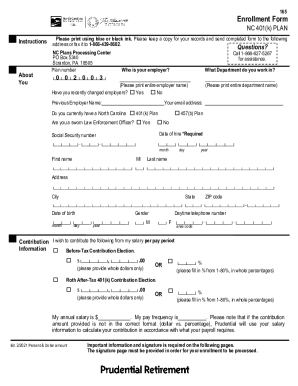
The NC 401(k) Plan enrollment form is essential for people looking to participate in North Carolina's retirement savings program. This guide provides clear and detailed instructions to assist users in completing the form accurately online, ensuring a smooth enrollment process.
Follow the steps to complete the NC 401(k) Plan enrollment form online.
- Press the ‘Get Form’ button to access the NC 401(k) Plan enrollment form and open it in your preferred editor.
- In the 'About You' section, fill in your plan number, employer name, and department. Indicate if you have changed employers recently and provide your previous employer's name if applicable.
- Fill in your contact information, including your email address, date of hire, and social security number. Make sure to provide your first name, middle initial, last name, address, city, state, ZIP code, date of birth, gender, and daytime telephone number.
- In the 'Contribution Information' section, select whether you wish to make before-tax contributions or Roth after-tax contributions, specifying either a dollar amount or a percentage from your salary per pay period.
- Choose your investment allocation by filling out Part I, II, or III of the investment section. Do not complete more than one part. Make sure to confirm your risk tolerance and expected retirement age, as applicable.
- Provide the designation of your primary and secondary beneficiaries in the relevant sections, including full legal names, social security numbers, dates of birth, addresses, relationships, and telephone numbers, ensuring all percentages total 100%.
- Optionally name a trusted contact person and provide their details as requested. This step is intended to assist Prudential in the event of suspected financial exploitation.
- Complete the authorization section by signing and dating the form, making sure to include your social security number.
- Save your completed form, and then proceed to download, print, or share the document as necessary.
Begin your enrollment in the NC 401(k) Plan online today!