Loading
Get Uscg Cg-4917 2022-2026
How it works
-

Open form follow the instructions
-

Easily sign the form with your finger
-

Send filled & signed form or save
How to fill out the USCG CG-4917 online
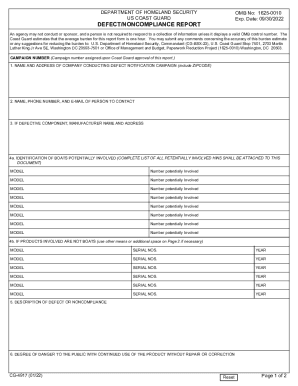
The USCG CG-4917 form, also known as the defect/noncompliance report, is essential for reporting issues related to safety standards in recreational vessels. This guide provides step-by-step instructions for users to complete the form online effectively and accurately.
Follow the steps to fill out the USCG CG-4917 online.
- Press the ‘Get Form’ button to access the document and open it in the online editor.
- In the section labeled '1. Name and address of company conducting defect notification campaign,' provide the company’s full name and address, including ZIP code.
- For '2. Name, phone number, and e-mail of person to contact,' enter the details of the contact person for further communication.
- If the report concerns a defective component, fill out '3. Manufacturer name and address' with the relevant details.
- In '4a. Identification of boats potentially involved,' list each boat model and the corresponding number potentially involved. Attach a complete list of all potentially involved Hull Identification Numbers (HINs) to the document.
- If the products involved are not boats, complete '4b' by providing the model, serial numbers, and year for each relevant product.
- Provide a detailed '5. Description of defect or noncompliance' outlining the nature of the issue.
- In '6. Degree of danger to the public,' assess and describe the potential risks associated with continued use of the product without repair.
- Detail the '7. Manner in which products recalled will be corrected,' using additional space on Page 2 if needed.
- In '8. Description of proposed correction,' specify who will perform the corrections, where, and when these will take place.
- Summarize the '9. Actions taken to date to correct this defect or noncompliance.'
- For '10. Current status of campaign,' provide the necessary information for each subsection a-f regarding the units involved.
- If applicable, reply to '11. If any of the information requested in 10 above is not available,' indicating when the information will be ready.
- Conclude by signing the report in the 'Signature of preparer' section, along with the title and date.
- Finally, ensure all changes are saved, then download, print, or share the completed form as needed.
Complete your documents online for efficient processing.