Loading
Form preview
  • US Legal Forms
  • Other Templates
  • More Forms
  • More Multi-State Forms
  • Canada Form F32 - British Columbia 2021

Get Canada Form F32 - British Columbia 2021

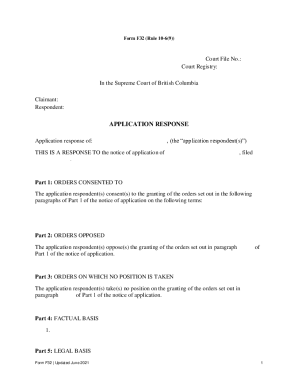
Form F32 (Rule 106(9))Court File No.: Court Registry: In the Supreme Court of British Columbia Claimant: Respondent:APPLICATION RESPONSE of:, (the application respondent(s))THIS IS A RESPONSE TO the.

How it works

  1. Open form

    Open form follow the instructions

  2. Easily sign form

    Easily sign the form with your finger

  3. Share form

    Send filled & signed form or save

How to fill out the Canada Form F32 - British Columbia online

Filling out the Canada Form F32 - British Columbia online is a straightforward process that requires careful attention to detail. This guide will walk you through each section of the form, ensuring that you provide the necessary information accurately.

Follow the steps to successfully complete the form.

  1. Click ‘Get Form’ button to access the form and open it in your preferred editor.
  2. Begin by filling in the court file number and the court registry details at the top section of the form. Ensure that you have the correct information verified.
  3. In the claimant and respondent sections, provide the full names of the parties involved, clearly distinguishing between the applicant and the respondent.
  4. Proceed to the application response section. Clearly state whether you consent to the granting of orders, oppose them, or take no position. Fill in the relevant details as applicable in Parts 1, 2, and 3.
  5. In the factual basis section, provide a concise summary of the facts you are relying on. This should be clear and direct to bolster your position.
  6. For the legal basis section, outline the legal grounds that support your response to the application.
  7. Include any material you will rely on in the designated section, as required.
  8. Fill in your address for service accurately, ensuring this is up to date. This is important for any correspondences regarding the case.
  9. Complete the date and signature section. Ensure that the signature is legible and corresponds to the name typed or printed.
  10. Review all fields for accuracy and completeness before saving your changes. You will have the option to download, print, or share the completed form.

Begin filling out your Canada Form F32 - British Columbia online today.

Get form

Experience a faster way to fill out and sign forms on the web. Access the most extensive library of templates available.

Related content

Stigma is where the harm comes from - PubMed
by T Goodyear · 2021 · Cited by 12 — 2021 Oct;96:103238. doi:...
Learn more
Report of the Technical Committee on Business...
Feb 5, 1996 — Dear Mr. Martin: We are pleased to submit to you the report of the...
Learn more
Table of Contents - IIS Windows Server
SYNC allows you to check your vehicle's overall 'health' in the form of diagnostic report...
Learn more

Related links form

TECHNICAL LITERATURE YORK LSTE COOLing TOwERS Firearm Application Core Desired Feelings Pdf State Form 19634

Get This Form Now!

Use professional pre-built templates to fill in and sign documents online faster. Get access to thousands of forms.
If you believe that this page should be taken down, please follow our DMCA take down processhere.
Get Canada Form F32 - British Columbia
  • Adoption
  • Bankruptcy
  • Contractors
  • Divorce
  • Home Sales
  • Employment
  • Identity Theft
  • Incorporation
  • Landlord Tenant
  • Living Trust
  • Name Change
  • Personal Planning
  • Small Business
  • Wills & Estates
  • Packages A-Z
  • Affidavits
  • Bankruptcy
  • Bill of Sale
  • Corporate - LLC
  • Divorce
  • Employment
  • Identity Theft
  • Internet Technology
  • Landlord Tenant
  • Living Wills
  • Name Change
  • Power of Attorney
  • Real Estate
  • Small Estates
  • Wills
  • All Forms
  • Forms A-Z
  • Other Templates
  • Legal Hub
  • About Us
  • Help Portal
  • Legal Resources
  • Blog
  • Affiliates
  • Contact Us
  • Delete My Account
  • Site Map
  • Industries
  • Forms in Spanish
  • Localized Forms
  • State-specific Forms
  • Forms Kit
  • Real Estate Handbook
  • All Guides
  • Notarize
  • Incorporation services
  • For Consumers
  • For Small Business
  • For Attorneys
  • USLegal
  • FormsPass
  • pdfFiller
  • signNow
  • altaFlow
  • DocHub
  • Instapage
Form Packages
  • Adoption
  • Bankruptcy
  • Contractors
  • Divorce
  • Home Sales
  • Employment
  • Identity Theft
  • Incorporation
  • Landlord Tenant
  • Living Trust
  • Name Change
  • Personal Planning
  • Small Business
  • Wills & Estates
  • Packages A-Z
Form Categories
  • Affidavits
  • Bankruptcy
  • Bill of Sale
  • Corporate - LLC
  • Divorce
  • Employment
  • Identity Theft
  • Internet Technology
  • Landlord Tenant
  • Living Wills
  • Name Change
  • Power of Attorney
  • Real Estate
  • Small Estates
  • Wills
  • All Forms
  • Forms A-Z
  • Other Templates
Customer Service
  • Legal Hub
  • About Us
  • Help Portal
  • Legal Resources
  • Blog
  • Affiliates
  • Contact Us
  • Delete My Account
  • Site Map
  • Industries
  • Forms in Spanish
  • Localized Forms
  • State-specific Forms
  • Forms Kit
Legal Guides
  • Real Estate Handbook
  • All Guides
Prepared for you
  • Notarize
  • Incorporation services
Our Customers
  • For Consumers
  • For Small Business
  • For Attorneys
Our Sites
  • USLegal
  • FormsPass
  • pdfFiller
  • signNow
  • altaFlow
  • DocHub
  • Instapage
Social Media
Call us now toll free:
+1 833 426 79 33
As seen in:
© Copyright 1999-2026 airSlate Legal Forms, Inc. 17 Station Street, Ste. 203, Brookline, MA 02445
  • Your Privacy Choices
  • Terms of Service
  • Privacy Notice
  • Content Takedown Policy
  • Bug Bounty Program
Canada Form F32 - British Columbia
This form is available in several versions.
Select the version you need from the drop-down list below.
2022 Canada Form F32 - British Columbia
Select form
  • 2022 Canada Form F32 - British Columbia
  • 2021 Canada Form F32 - British Columbia
Select form