Loading
Get 32bj Direct Deposit Agreement 2017-2026
How it works
-

Open form follow the instructions
-

Easily sign the form with your finger
-

Send filled & signed form or save
How to fill out the 32BJ Direct Deposit Agreement online
Filling out the 32BJ Direct Deposit Agreement online is a straightforward process that ensures your pension benefits are deposited directly into your bank account. This guide will walk you through each section of the form, providing clear instructions to help you complete it accurately.
Follow the steps to complete the direct deposit agreement online
- Press the ‘Get Form’ button to access the 32BJ Direct Deposit Agreement and open it in the online editor.
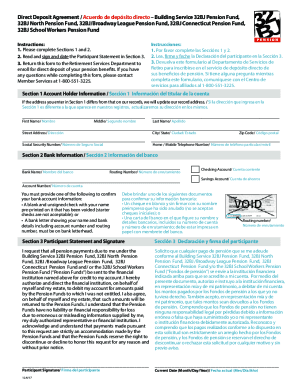
- In Section 1, enter your account holder information. This includes your first name, middle name, last name, street address, city, state, social security number, and home or mobile telephone number. If your address differs from the current records, it will be updated accordingly.
- Move on to Section 2 to provide your bank information. Fill in your bank name, routing number, and select whether it is a checking or savings account. Also, enter your account number. Remember, you must provide verification of your bank account by uploading a voided check or a bank letter with your details on bank letterhead.
- In Section 3, read the Participant Statement carefully. This section includes important information about the authorization for your pension payments. Sign and date the statement to confirm your request.
- After completing all sections, review your entries for accuracy. Save your changes, and then choose to download, print, or share the completed form. Lastly, return the form to the Retirement Services Department to finalize your enrollment for direct deposit.
Complete your 32BJ Direct Deposit Agreement online today to ensure timely processing of your pension benefits.