Loading
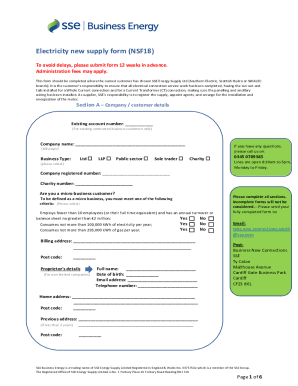
Get Uk Sse Business Energy Nsf18 2018-2026
How it works
-

Open form follow the instructions
-

Easily sign the form with your finger
-

Send filled & signed form or save
How to fill out the UK SSE Business Energy NSF18 online
Completing the UK SSE Business Energy NSF18 form is a crucial step for businesses seeking an electricity new supply. This guide provides comprehensive instructions to assist users in efficiently filling out the form online, ensuring all necessary information is accurately submitted to avoid delays.
Follow the steps to successfully complete the NSF18 form.
- Click ‘Get Form’ button to access the NSF18 document and open it for editing.
- Begin with Section A, which requires company and customer details. Enter the existing account number if applicable, and provide the company name, business type, and registered/charity number. Indicate if you qualify as a micro business by selecting the relevant criteria.
- Fill out the billing address and proprietor's details if the company is not limited. Ensure to complete all required fields, including contact information and previous address if necessary.
- Navigate to Section B, which requests site supply and access details. Input the Core MPAN number, service point position, and supply address. Explain the purpose of the site supply and provide contact information of the person who will be present during meter installation.
- Answer questions regarding the completion of work by the Distribution Network Operator and the electrical contractor. Confirm site access arrangements and the availability of resources like parking.
- Proceed to Section C, where you indicate the supply type and metering requirements. Choose your preferred installation date, and accurately specify the available capacity and estimated annual consumption.
- Complete the supply type section based on whether it's Whole Current or Current Transformer. If necessary, specify appointed agents for metering services.
- In the declaration section, confirm your authorization and liability regarding the registration process. Provide your printed name, company name, job title, and contact information, and ensure to sign and date the document.
- Review all sections to ensure there are no incomplete fields. If everything is accurate, save your changes, then download, print, or share the form as required.
Start completing your UK SSE Business Energy NSF18 form online now to ensure a smooth energy supply process.
The same year, Octopus replaced SSE as the energy supplier for M&S Energy, a brand of Marks & Spencer, and bought Affect Energy, which had 22,000 customers.