Loading
Get Md Lake Arbor Foundation Registration Form 2018
How it works
-

Open form follow the instructions
-

Easily sign the form with your finger
-

Send filled & signed form or save
How to fill out the MD Lake Arbor Foundation Registration Form online
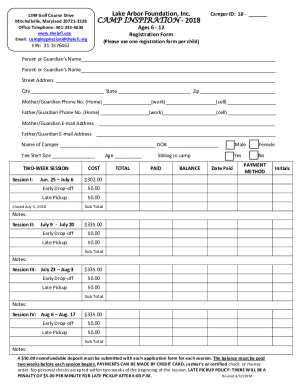
Filling out the MD Lake Arbor Foundation Registration Form online is a straightforward process designed to help you register your child for camp effectively. This guide will provide step-by-step instructions to ensure that you complete the form accurately and efficiently.
Follow the steps to complete the registration form with ease.
- Click ‘Get Form’ button to access the registration form and display it in your preferred viewing platform.
- Begin by entering the camper ID in the designated space provided at the top of the form. This helps to uniquely identify your child.
- Provide the names of the parent or guardian in the appropriate fields. Ensure that you include both first and last names for clear identification.
- Fill in the complete street address, city, state, and ZIP code of the parent or guardian. This information is crucial for communication purposes.
- Input the phone numbers for both parents or guardians, including home, work, and cell numbers. Ensure that the numbers are accurate for any urgent communications.
- Enter the email addresses of both parents or guardians in the corresponding fields. This will allow for electronic correspondence regarding the camp.
- In the camper information section, include the name of the camper and their date of birth. Make sure to verify the date to avoid any discrepancies.
- Select the tee shirt size for your camper. This is vital for ensuring that they receive the appropriate apparel during their camp sessions.
- Choose the camp session you want to enroll your child in by marking the appropriate option. Review the session dates and costs to ensure you select correctly.
- Calculate and input the total cost based on the chosen sessions and required services like early drop-off or late pickup. Be aware of the nonrefundable deposit required.
- Indicate whether there is a sibling enrolled in the camp by checking ‘Yes’ or ‘No.’ This assists in managing family attendance.
- Select the payment method from the options provided. Note that personal checks are not accepted within two weeks of the session, so plan accordingly.
- Once all fields are completed, review the form for accuracy. Save your changes and follow instructions to download, print, or share as necessary.
Take action now and complete your registration form online to secure your child's spot at the MD Lake Arbor Foundation Camp Inspiration.
Get form
Experience a faster way to fill out and sign forms on the web. Access the most extensive library of templates available.
Get This Form Now!
Use professional pre-built templates to fill in and sign documents online faster. Get access to thousands of forms.