Loading
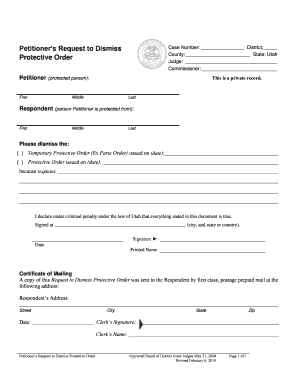
Get Ut Petitioners Request To Dismiss Protective Order 2019-2026
How it works
-

Open form follow the instructions
-

Easily sign the form with your finger
-

Send filled & signed form or save
How to fill out the UT Petitioners Request To Dismiss Protective Order online
This guide provides clear, step-by-step instructions on how to complete the UT Petitioners Request To Dismiss Protective Order form online. By following these guidelines, users can efficiently fill out the necessary information and submit their request for dismissal.
Follow the steps to complete your online form efficiently.
- Click ‘Get Form’ button to obtain the form and open it in your editing platform.
- Enter the case number in the designated field. Ensure you provide the correct district and county for accurate processing.
- Fill in the details for the protected person (Petitioner) including first, middle, and last name.
- Next, enter the details of the respondent (the person you are protected from), also requiring their first, middle, and last name.
- Indicate which order you wish to dismiss by checking the appropriate box next to 'Temporary Protective Order' or 'Protective Order' and provide the date it was issued.
- In the explanation section, clearly state the reasons for your request to dismiss the protective order.
- Complete the declaration statement by signing the document. Also, fill in the city and state or country where you are signing.
- Enter the date of signing and provide your printed name.
- Fill out the Certificate of Mailing section. Include the respondent's address and the date when the request was sent to them.
- Finally, include the clerk's signature and name in the designated fields if required.
- Once you have filled out the form completely, save your changes, and ensure you download or print a copy, or share the form as needed.
Start completing your documents online today!