Get Pto-1595 2012
How it works
-

Open form follow the instructions
-

Easily sign the form with your finger
-

Send filled & signed form or save
How to fill out the PTO-1595 online
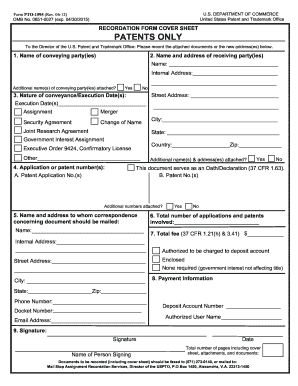
The PTO-1595 form is essential for recording patent assignments with the U.S. Patent and Trademark Office. Completing this form accurately is crucial for ensuring the proper transfer of rights and interests in patents. This guide will provide you with a clear, step-by-step approach to filling out the PTO-1595 online.
Follow the steps to successfully complete the PTO-1595 form online.
- Click the ‘Get Form’ button to obtain the form and open it in the editor.
- Begin with item 1 by entering the full name of the party or parties conveying the interest. If there is more information to provide, use the 'Yes' option to indicate that additional names are included on an attached page.
- In item 2, provide the name and complete address of the party or parties receiving the interest. Again, if additional parties are involved, indicate this by checking the appropriate box.
- For item 3, record the execution date(s) of the document, preferably using the full month name or an abbreviation. Select the nature of the conveyance from the provided options and specify if necessary.
- In item 4, enter the application or patent number(s) relevant to the document. Ensure all numbers are complete and use the appropriate checkboxes to indicate if additional numbers are attached.
- For item 5, list the name and address for correspondence regarding the document.
- In item 6, count the total number of applications and patents involved and enter the figure.
- For item 7, indicate the total fee enclosed or authorized for payment related to the filings.
- In item 8, provide your payment information, including any required account details.
- Final section, item 9, requires the signature of the person submitting the document, along with their printed name and date.
- After completing the form, review all entries for accuracy, then save your changes, download a copy for your records, and prepare to share or print as needed.
Complete your PTO-1595 form online today to ensure your patent assignments are accurately recorded.
Get form
Related links form
A notice of recordation of assignment indicates that a patent's ownership has officially changed, as recorded in the patent office, often related to documents like the PTO-1595. This notice acts as public evidence of the assignment and safeguards the interests of the new owner. Having this recorded is vital for enforcing rights and providing security in patent transactions.