Loading
Get Sandia National Laboratories Sf 9424-eft 2022-2026
How it works
-

Open form follow the instructions
-

Easily sign the form with your finger
-

Send filled & signed form or save
How to fill out the Sandia National Laboratories SF 9424-EFT online
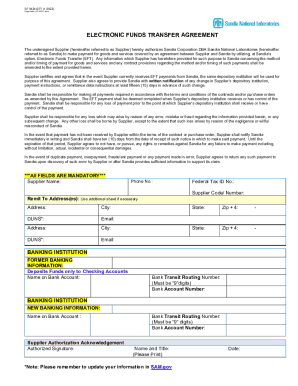
Filling out the Sandia National Laboratories SF 9424-EFT online is a straightforward process that facilitates electronic funds transfer for suppliers. This guide provides clear, step-by-step instructions to ensure that you complete the form accurately and efficiently.
Follow the steps to successfully complete the SF 9424-EFT online.
- Click 'Get Form' button to acquire the SF 9424-EFT form and open it in your preferred editor.
- Enter the supplier name in the appropriate field. This is a mandatory field and should reflect the official name of your organization.
- Provide your contact phone number in the designated field. Ensure that this number is current and accurate for effective communication.
- Input your supplier code or number, which should be assigned by Sandia. If you do not have this information, please reach out to your Sandia contact for assistance.
- Fill in the remit to addresses. You may need to use additional sheets if you have more than one address. Make sure to include the address, city, and DUNS number for each location.
- Enter your email address for correspondence related to the electronic funds transfer.
- Complete the federal tax ID number, ensuring that it matches your organization’s official records.
- Next, provide the banking information. Start with the former banking information if applicable, including the name on the bank account, the bank transit routing number (which must be 9 digits), and the bank account number.
- Then, input the new banking information, if a change is being made. Repeat the same information as in the former banking section.
- Sign the supplier authorization acknowledgement by adding your authorized signature. This confirms your consent to the terms of the agreement.
- Print your name and title in the designated fields to validate the signature.
- Finally, provide the date of signing to complete the form.
- Once all fields are filled out and reviewed for accuracy, save your changes, and download or print the form as needed for your records.
Complete your documents online today to streamline your payment process.