Loading
Get Me Fm-050 2020-2026
How it works
-

Open form follow the instructions
-

Easily sign the form with your finger
-

Send filled & signed form or save
How to fill out the ME Fm-050 online
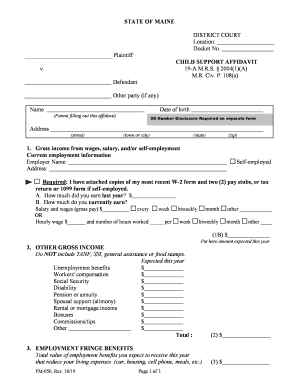
This guide provides clear instructions on filling out the ME Fm-050, the child support affidavit used in Maine. It is designed to assist everyone, regardless of their legal experience, in completing the form accurately and efficiently.
Follow the steps to fill out the ME Fm-050 online successfully.
- Press the ‘Get Form’ button to access the form and open it in the editor.
- Begin by entering your name, date of birth, and social security number. Note that the social security number must be disclosed on a separate form.
- Provide your current address including street, town or city, state, and zip code.
- In Section 1, input your gross income from wages or self-employment. Attach the required documents such as W-2 forms or pay stubs.
- In Section 2, list any other gross income you expect for the year, excluding TANF, SSI, general assistance, or food stamps. Include details for each type of income.
- Complete Section 3 by estimating the total value of your employment fringe benefits that reduce living expenses.
- In Section 4, total your gross income from Sections 1B, 2, and 3 and ensure this amount is correctly reflected on the Child Support Worksheet.
- Fill out Section 5 to report any yearly support you pay for other children. List each child's name and the total amount you pay.
- For Section 6, indicate your weekly health insurance cost and attach the required health insurance premium sheet.
- In Section 7, report your weekly child care costs and provide documentation as required.
- List any extraordinary medical expenses for children in Section 8, along with necessary details for each child.
- Fill out Section 9 with information about other children living in your home not involved in this case.
- Complete Section 10 by checking all applicable benefits received on behalf of the child and any additional information that might affect your child support obligations.
- In Section 11, provide details about your current assets and debts.
- Finally, review the form for accuracy, sign it, and ensure that all required attachments are included before submitting.
Start filling out your ME Fm-050 online today!