Loading
Get Ri Ri-2625 2021-2026
How it works
-

Open form follow the instructions
-

Easily sign the form with your finger
-

Send filled & signed form or save
How to fill out the RI RI-2625 online
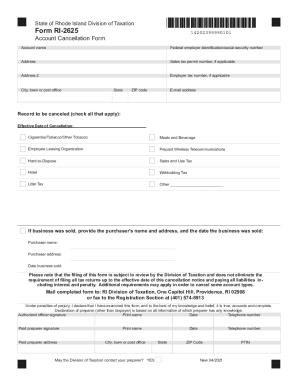
Filling out the RI RI-2625 form online is an essential step for users who wish to cancel their tax accounts in Rhode Island. This guide provides a clear and supportive walkthrough of the form's components, ensuring that all necessary information is submitted accurately and efficiently.
Follow the steps to fill out the RI RI-2625 form effectively.
- Click the ‘Get Form’ button to obtain the form and open it in your preferred online editing tool.
- Enter the account name in the designated field, ensuring it matches the official business name used for tax purposes.
- Provide the federal employer identification number or social security number in the specified section for identification purposes.
- Fill in your complete address, including address line 2 if necessary, city, state, and ZIP code.
- If applicable, enter your sales tax permit number and employer tax number.
- Input your email address to facilitate communication regarding your cancellation.
- Check all applicable records to be canceled from the listed options, including sales and use tax, withholding tax, and others.
- Specify the effective date of cancellation clearly in the provided field.
- If the business was sold, provide the purchaser's name and address along with the date of sale.
- Review all entered information for accuracy before submitting.
- After ensuring everything is correct, save changes, download, print, or share the completed form as necessary.
Begin your document completion process online now to ensure timely cancellation.
Related links form
Rhode Island Tax Account Numbers The first 9 digits of your new account number should match your federal EIN. If you already have a Rhode Island Withholding Account Number, you can find it on previous correspondence from the RI Department of Revenue or by contacting the agency at 401-574-8829.