Loading
Form preview
  • US Legal Forms
  • Other Templates
  • Industry Forms
  • Industry Bank & Financial Forms
  • Lloyds Bank 13250 2021

Get Lloyds Bank 13250 2021-2026

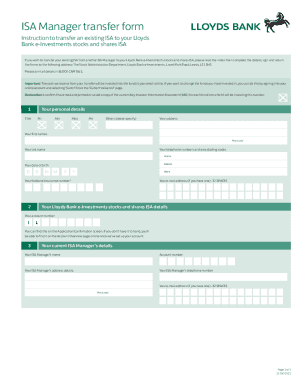
ISA Manager transfer form Instruction to transfer an existing ISA to your Lloyd's Bank investments stocks and shares ISA If you wish to transfer your existing ISA from another ISA Manager to your.

How it works

  1. Open form

    Open form follow the instructions

  2. Easily sign form

    Easily sign the form with your finger

  3. Share form

    Send filled & signed form or save

How to fill out the Lloyds Bank 13250 online

Filling out the Lloyds Bank 13250 form for transferring your existing ISA is a straightforward process. This guide will provide you with detailed, step-by-step instructions to help you complete the form accurately and efficiently.

Follow the steps to fill out the Lloyds Bank 13250 form online.

  1. Click ‘Get Form’ button to obtain the form and open it in your editor.
  2. Complete the personal details section. This includes your title, full name, address, telephone numbers, date of birth, and National Insurance number. Ensure to print all details in block capitals.
  3. Enter your email address, if you have one. Provide your Lloyds Bank e-Investments stocks and shares ISA account number. If you cannot locate this, it is available in the Application Confirmation screen or the Account Overview page online.
  4. Fill in the details of your current ISA Manager. Include the name, account number, address, and contact details of your current ISA Manager.
  5. Specify the type of ISA you wish to transfer from by completing the relevant section (A for Stocks and Shares ISA, B for Cash ISA, C for Innovative Finance ISA, or D for Lifetime ISA). Make sure to only cross one box.
  6. Determine how much of your ISA you want to transfer by selecting the appropriate option for your ISA type, indicating whether you want to transfer an entire ISA or portions of previous year’s subscriptions.
  7. Provide your authorisation for your existing ISA Manager to sell the investments in the ISA and transfer the cash to Lloyds Bank e-Investments. This includes signing and dating the declaration.
  8. Review all information provided to ensure accuracy before submitting the form. Check for any potential exit charges from your current ISA Manager.
  9. Once you have completed the form, you can save changes, download a copy, print it, or share the form as required.

Start your transfer process and complete the Lloyds Bank 13250 form online today.

Get form

Experience a faster way to fill out and sign forms on the web. Access the most extensive library of templates available.
Get form

Related content

Lloyds Banking Group Plc 2018 6-K Report of...
Jul 9, 2018 · Form Report of foreign issuer filed by Lloyds Banking Group Plc with the...
Learn more
OpenELIS Web Portal Access Request Form
15253 - LLOYD VET MEDICAL CENTER, 1809 S RIVERSIDE DR, AMES, IA ... 8486 - MERCYCARE...
Learn more
Ma Barker - Ma Barker - qaz.wiki
Sep 11, 2020 — En 1928, Lloyd Barker fue encarcelado en la penitenciaría federal de...
Learn more

Related links form

How To Fill Bank Form II Form For Giving Intimation Or Seeking Previous Sanction Under Rule 18 (3) Of The CCS (Conduct) Hacfm Application Mega Traveller Form Fillable

Get This Form Now!

Use professional pre-built templates to fill in and sign documents online faster. Get access to thousands of forms.
Get form
If you believe that this page should be taken down, please follow our DMCA take down processhere.
Get Lloyds Bank 13250
Get form
  • Adoption
  • Bankruptcy
  • Contractors
  • Divorce
  • Home Sales
  • Employment
  • Identity Theft
  • Incorporation
  • Landlord Tenant
  • Living Trust
  • Name Change
  • Personal Planning
  • Small Business
  • Wills & Estates
  • Packages A-Z
  • Affidavits
  • Bankruptcy
  • Bill of Sale
  • Corporate - LLC
  • Divorce
  • Employment
  • Identity Theft
  • Internet Technology
  • Landlord Tenant
  • Living Wills
  • Name Change
  • Power of Attorney
  • Real Estate
  • Small Estates
  • Wills
  • All Forms
  • Forms A-Z
  • Other Templates
  • Legal Hub
  • About Us
  • Help Portal
  • Legal Resources
  • Blog
  • Affiliates
  • Contact Us
  • Delete My Account
  • Site Map
  • Industries
  • Forms in Spanish
  • Localized Forms
  • State-specific Forms
  • Forms Kit
  • Real Estate Handbook
  • All Guides
  • Notarize
  • Incorporation services
  • For Consumers
  • For Small Business
  • For Attorneys
  • USLegal
  • FormsPass
  • pdfFiller
  • signNow
  • altaFlow
  • DocHub
  • Instapage
Form Packages
  • Adoption
  • Bankruptcy
  • Contractors
  • Divorce
  • Home Sales
  • Employment
  • Identity Theft
  • Incorporation
  • Landlord Tenant
  • Living Trust
  • Name Change
  • Personal Planning
  • Small Business
  • Wills & Estates
  • Packages A-Z
Form Categories
  • Affidavits
  • Bankruptcy
  • Bill of Sale
  • Corporate - LLC
  • Divorce
  • Employment
  • Identity Theft
  • Internet Technology
  • Landlord Tenant
  • Living Wills
  • Name Change
  • Power of Attorney
  • Real Estate
  • Small Estates
  • Wills
  • All Forms
  • Forms A-Z
  • Other Templates
Customer Service
  • Legal Hub
  • About Us
  • Help Portal
  • Legal Resources
  • Blog
  • Affiliates
  • Contact Us
  • Delete My Account
  • Site Map
  • Industries
  • Forms in Spanish
  • Localized Forms
  • State-specific Forms
  • Forms Kit
Legal Guides
  • Real Estate Handbook
  • All Guides
Prepared for you
  • Notarize
  • Incorporation services
Our Customers
  • For Consumers
  • For Small Business
  • For Attorneys
Our Sites
  • USLegal
  • FormsPass
  • pdfFiller
  • signNow
  • altaFlow
  • DocHub
  • Instapage
Social Media
Call us now toll free:
+1 833 426 79 33
As seen in:
© Copyright 1999-2026 airSlate Legal Forms, Inc. 17 Station Street, Ste. 203, Brookline, MA 02445
  • Your Privacy Choices
  • Terms of Service
  • Privacy Notice
  • Content Takedown Policy
  • Bug Bounty Program