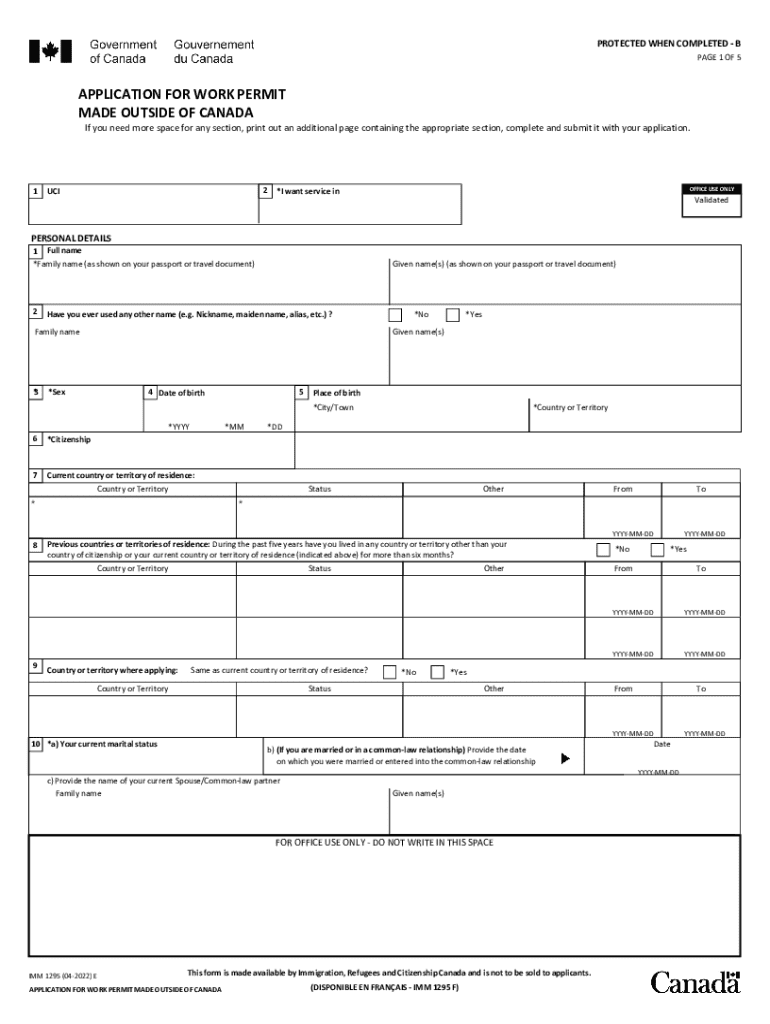
And submit it with your application. Validate Clear Form JavaScript has been disabled, the form requires JavaScript to validate properly. Please enable JavaScript through Preferences under the Edit menu and reopen the form. 1 OFFICE USE ONLY 2 *I want service in UCI Validated PERSONAL DETAILS 1 Full name *Family name (as shown on your passport or travel document) 2 Given name(s) (as shown on your passport or travel document) Have you ever used any other name (e.g. Nickname, maiden na.

Open form follow the instructions

Easily sign the form with your finger

Send filled & signed form or save
How to fill out the Canada IMM 1295 E online
Filling out the Canada IMM 1295 E form online is an essential step in applying for a work permit from outside Canada. This guide offers a user-friendly approach to help you navigate through each component of the form with ease.
Follow the steps to complete your application accurately.
- Click 'Get Form' button to obtain the form and open it in the editor.
- Provide your personal details. Enter your full name as shown on your passport, including family name and given name(s). If you have used any other name, document that as well.
- Indicate your sex and complete your date of birth. Include your citizenship and current country of residence.
- List any previous countries of residence during the past five years along with your current marital status. If applicable, provide details about your spouse or common-law partner.
- Indicate your native language and if you can communicate in English or French. Mention if you have taken a language test.
- Provide details of your passport, including the country of issue, passport number, issue date, and expiry date.
- If applicable, include information about any national identity documents you have. Provide the expiration and issue dates.
- Fill out your contact information. Indicate your current mailing address and whether it is the same as your residential address.
- Document the intended work details in Canada, specifying the type of work permit you are applying for, your employer's details, job title, and a brief description of your duties.
- Fill in your education and employment history for the past ten years. Ensure to include any post-secondary education information.
- Complete the background information section, answering various questions related to your health and legal history, if applicable.
- Sign and date the application. Ensure all required documents, including photos and fees, are included before submission.
Start completing your Canada IMM 1295 E application online today!
Experience a faster way to fill out and sign forms on the web. Access the most extensive library of templates available.
Related content
Province City/ Town Address IMM 1295 (01-2011) E PAGE 3 OF 4 Applicant Name Date of Birth...
Get answers to your most pressing questions about US Legal Forms API.
Can I check my Lmia status?
There is no way for the candidate / potential employee to check the status of an LMIA. Only the company / employer can do this. Note that it's not immigration who processes the LMIA.
How do I complete IMM 5710?
1:51 11:28 Suggested clip How to download and complete IMM5710 form? - YouTubeYouTubeStart of suggested clipEnd of suggested clip How to download and complete IMM5710 form? - YouTube
How can I get a work permit outside Canada?
Application For Work Permit Made Outside of Canada (IMM 1295) ( PDF , 465.84 KB ) Document Checklist (IMM 5488) ( PDF , 316.89 KB ) Family Information (IMM 5645 or IMM 5707) Statutory Declaration of Common-law Union (IMM 5409) ( PDF , 636.51 KB ), if it applies to you.
How do I fill out an application for a work permit made outside of Canada?
Application For Work Permit Made Outside of Canada (IMM 1295) ( PDF , 465.84 KB ) Document Checklist (IMM 5488) ( PDF , 316.89 KB ) Family Information (IMM 5645 or IMM 5707) Statutory Declaration of Common-law Union (IMM 5409) ( PDF , 636.51 KB ), if it applies to you.
How can I get Lmia work permit?
a job offer letter, a contract, a copy of the LMIA, and. the LMIA number.
How do I apply for a work permit at Service Canada?
1. Apply for your visitor visa, study permit or work permit. If you want to visit, study or work in Canada, make sure you're eligible to apply. Use our application guides to help fill out your application properly, then submit your application.
How do I fill out form IMM 5257?
1:12 10:07 Suggested clip How to complete imm 5257 for Canadian Visa - YouTubeYouTubeStart of suggested clipEnd of suggested clip How to complete imm 5257 for Canadian Visa - YouTube
How can I apply for spouse open work permit in Canada?
Copy of student's study permit. Copy of spouse/partner's study/work permit, visitor record or visa (if applicable) UBC Letter of Enrollment. Copy of marriage certificate or common-law declaration (and official translation, if not in English or French) Proof of funds.
What is imm1295?
About Work Permit Form IMM 1295 Form IMM 1295 is used by individuals who are currently not Canadian citizens or permanent residents of Canada and who wish to work temporarily in Canada. In addition, some countries may require individuals to obtain a temporary resident visa.
Use professional pre-built templates to fill in and sign documents online faster. Get access to thousands of forms.
If you believe that this page should be taken down, please follow our DMCA take down process here.