Loading
Form preview
  • US Legal Forms
  • Other Templates
  • More Forms
  • More Multi-State Forms
  • India Nps Subscriber Registration Form 2022

Get India Nps Subscriber Registration Form 2022-2026

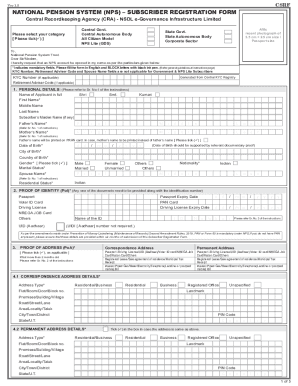
Carver 1.5NATIONAL PENSION SYSTEM (NPS) SUBSCRIBER REGISTRATION FORM Central Record keeping Agency (CRA) NDDL governance Infrastructure Limited Central Govt. Central Autonomous Body All Citizen Model.

How it works

  1. Open form

    Open form follow the instructions

  2. Easily sign form

    Easily sign the form with your finger

  3. Share form

    Send filled & signed form or save

How to fill out the India NPS Subscriber Registration Form online

Filling out the India NPS Subscriber Registration Form online can seem daunting at first. This guide aims to break down each component of the form and provide step-by-step instructions to ensure a smooth and efficient registration process for all users.

Follow the steps to complete the NPS Subscriber Registration Form online.

  1. Click ‘Get Form’ button to obtain the form and open it in the editor.
  2. Begin by selecting your category of subscription by ticking the appropriate box. There are options such as Central Government, State Government, Corporate Sector, etc.
  3. Provide your personal details in the specified fields, ensuring to fill in your name, date of birth, and marital status accurately. Use BLOCK letters and black ink as instructed.
  4. Enter your proof of identity by selecting one document from the options provided, such as a passport or a driving license. You will need to include the relevant identification number.
  5. Fill in your proof of address. Choose a document like an electricity bill or bank statement that supports the address you provide.
  6. Complete your contact details, including your mobile number and email ID. Note that the mobile number is mandatory for communication.
  7. Indicate your occupation and income range by ticking the appropriate options.
  8. Provide your bank details accurately, ensuring to fill in the account type, bank account number, and IFSC code.
  9. Fill in the nomination details if you wish to nominate beneficiaries. You can nominate up to three individuals.
  10. Select your pension fund options. You may need to specify whether you would like to choose a Tier II account and select your preferred pension fund.
  11. Ensure to review all the filled in information for accuracy before proceeding to finalize.
  12. Finally, save the changes, and you can choose to download, print, or share the completed form as required.

Start filling out the India NPS Subscriber Registration Form online today to take your first step towards a secured retirement.

Get form

Experience a faster way to fill out and sign forms on the web. Access the most extensive library of templates available.
Get form

Related content

Practitioner Controlled Substances Registration...
Application for CSR for Practitioners. An Indiana Controlled Substances Registration...
Learn more
Version 1.3 Application for Allotment of Permanent...
Version 1.3 Application for Allotment of Permanent Retirement Account Number (PRAN.
Learn more
acronym.pdf
GSN Global Subscriber Number. GSO Geostationary Satellite Orbit. GSS Generalized Spectral...
Learn more

Related links form

Ghana Revenue Authority Forms Sample Letter Of Medical Necessity Rheumatoid Arthritis. A Letter Of Medical Necessity Might Be Iso 3651 2 Pdf Download Sample Daily Lesson Plan (3rd Class)

Questions & Answers

Get answers to your most pressing questions about US Legal Forms API.

Contact support

An NPS survey asks customers whether or not they would recommend a product to their friends or family, while eNPS surveys ask whether or not the employee would recommend the company to friends and family.

eNPS stands for employee net promoter score. The difference between NPS and eNPS is the survey audience. NPS typically measures results from customers or members, while eNPS measures results and company ratings from employees.

eNPS is a survey-based method of determining whether employees are happy, satisfied, and loyal to their workplace. eNPS is one of the most effective metrics for gaining insight into your employees' feelings and opinions.

Based on the number that is given, the customer is then placed into one of the three categories: Promoter, Passive, or Detractor. These categories describe how the customer feels about the product or service, their loyalty to the company, and whether or not they would recommend it.

An NPS survey asks customers whether or not they would recommend a product to their friends or family, while eNPS surveys ask whether or not the employee would recommend the company to friends and family.

You can go to your nearest POP-SP and submit the PRAN application along with the KYC documents. PRAN card will be sent to your correspondence address by CRA. You are required to make your first contribution (minimum of Rs 500) at the time of applying for registration to any POP-SP.

Go to PFRDA/ NPS Trust website and choose “eNPS”. Click on “Registration” button and select “New Registration” option to initiate the registration process. Select 'Non Resident Indian (NRI)' and Select type of account “Repatriable” or “Non- repatriable” and select option for registering with as “Aadhaar”. Generate OTP.

“National Pension System” (NPS) means the contributory pension system whereby contributions from a subscriber are collected and accumulated in an individual pension account called PRAN using a system of points of presence, a central recordkeeping agency and pension funds as may be specified by regulations.

Get This Form Now!

Use professional pre-built templates to fill in and sign documents online faster. Get access to thousands of forms.
Get form
If you believe that this page should be taken down, please follow our DMCA take down processhere.
Get India NPS Subscriber Registration Form
Get form
  • Adoption
  • Bankruptcy
  • Contractors
  • Divorce
  • Home Sales
  • Employment
  • Identity Theft
  • Incorporation
  • Landlord Tenant
  • Living Trust
  • Name Change
  • Personal Planning
  • Small Business
  • Wills & Estates
  • Packages A-Z
  • Affidavits
  • Bankruptcy
  • Bill of Sale
  • Corporate - LLC
  • Divorce
  • Employment
  • Identity Theft
  • Internet Technology
  • Landlord Tenant
  • Living Wills
  • Name Change
  • Power of Attorney
  • Real Estate
  • Small Estates
  • Wills
  • All Forms
  • Forms A-Z
  • Other Templates
  • Legal Hub
  • About Us
  • Help Portal
  • Legal Resources
  • Blog
  • Affiliates
  • Contact Us
  • Delete My Account
  • Site Map
  • Industries
  • Forms in Spanish
  • Localized Forms
  • State-specific Forms
  • Forms Kit
  • Real Estate Handbook
  • All Guides
  • Notarize
  • Incorporation services
  • For Consumers
  • For Small Business
  • For Attorneys
  • USLegal
  • FormsPass
  • pdfFiller
  • signNow
  • altaFlow
  • DocHub
  • Instapage
Form Packages
  • Adoption
  • Bankruptcy
  • Contractors
  • Divorce
  • Home Sales
  • Employment
  • Identity Theft
  • Incorporation
  • Landlord Tenant
  • Living Trust
  • Name Change
  • Personal Planning
  • Small Business
  • Wills & Estates
  • Packages A-Z
Form Categories
  • Affidavits
  • Bankruptcy
  • Bill of Sale
  • Corporate - LLC
  • Divorce
  • Employment
  • Identity Theft
  • Internet Technology
  • Landlord Tenant
  • Living Wills
  • Name Change
  • Power of Attorney
  • Real Estate
  • Small Estates
  • Wills
  • All Forms
  • Forms A-Z
  • Other Templates
Customer Service
  • Legal Hub
  • About Us
  • Help Portal
  • Legal Resources
  • Blog
  • Affiliates
  • Contact Us
  • Delete My Account
  • Site Map
  • Industries
  • Forms in Spanish
  • Localized Forms
  • State-specific Forms
  • Forms Kit
Legal Guides
  • Real Estate Handbook
  • All Guides
Prepared for you
  • Notarize
  • Incorporation services
Our Customers
  • For Consumers
  • For Small Business
  • For Attorneys
Our Sites
  • USLegal
  • FormsPass
  • pdfFiller
  • signNow
  • altaFlow
  • DocHub
  • Instapage
Social Media
Call us now toll free:
+1 833 426 79 33
As seen in:
© Copyright 1999-2026 airSlate Legal Forms, Inc. 17 Station Street, Suite 303, Brookline, MA 02445
  • Your Privacy Choices
  • Terms of Service
  • Privacy Notice
  • Content Takedown Policy
  • Bug Bounty Program