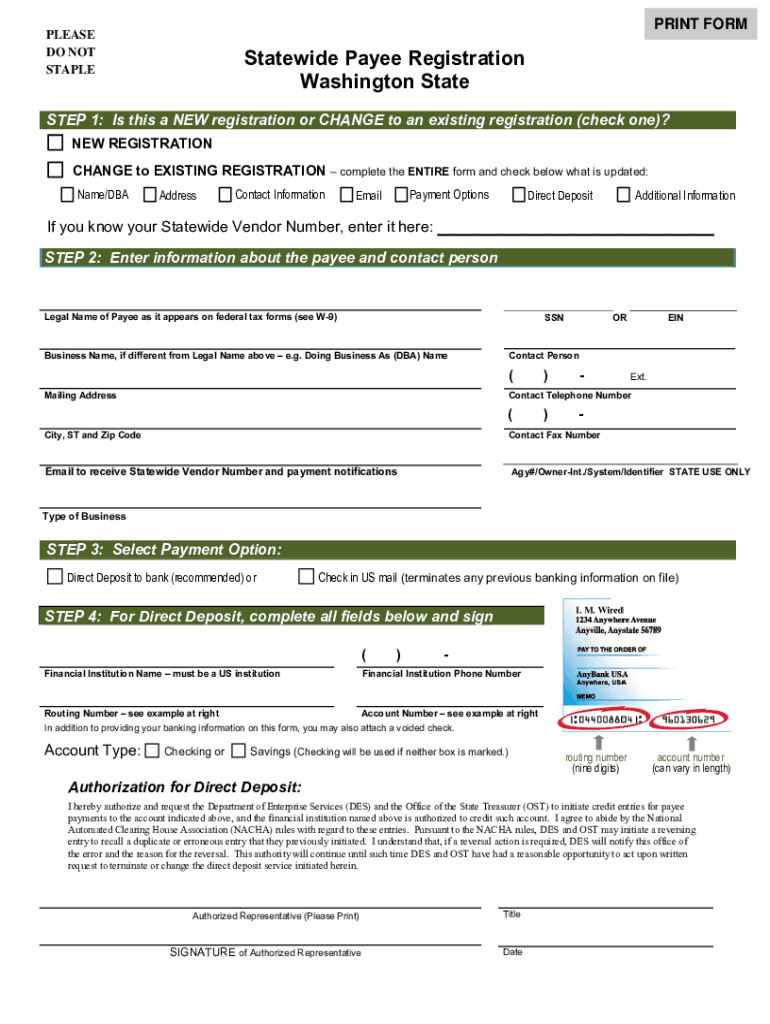
PRINT FORM PLEASE DO NOT STAPLE Statewide Payee Registration Washington State STEP 1: Is this a NEW registration or CHANGE to an existing registration (check one)? NEW REGISTRATION CHANGE to EXISTING.

Open form follow the instructions

Easily sign the form with your finger

Send filled & signed form or save
How to fill out the WA F120-115-000 online
The WA F120-115-000 form is essential for payee registration in Washington State. This guide provides clear, step-by-step instructions to help users successfully complete the form online.
Follow the steps to efficiently complete the WA F120-115-000 online.
- Click the ‘Get Form’ button to access the form and open it in your preferred online editor.
- Determine if this is a new registration or an update to an existing registration. Check the appropriate box at the top of the form. If it is a change, ensure to complete the entire form and indicate what information is being updated.
- Enter the legal name of the payee as it appears on federal tax forms and provide their social security number (SSN) or employer identification number (EIN). If applicable, include the business name or DBA, along with your contact person's name, mailing address, telephone number, and email for notifications.
- Choose your preferred payment option by selecting either direct deposit or check. If you select direct deposit, proceed to fill in the details of your financial institution, including the institution's name, phone number, routing number, and account number.
- Complete the authorization for direct deposit section, ensuring to sign and date where prompted. This grants permission for payments to be credited to the specified account.
- Fill out the Request for Taxpayer Identification Number (W-9) section. This requires the legal name, business name (if applicable), taxpayer identification number (TIN), and your signature to certify the correctness of the information provided.
- After completing all sections, ensure to review the information for accuracy. You have the option to save changes, download a copy of the form, print it, or share it as needed.
- Finally, submit the completed form for processing. For fastest service, print, sign, and fax to the appropriate number, or mail to the specified address.
Complete your WA F120-115-000 form online today for a smooth registration process.
Experience a faster way to fill out and sign forms on the web. Access the most extensive library of templates available.
Related content
F120-115-000 Accounts Payable Statewide Payee and W-9 Form 11-2019. Page 1 of 2. Statewide...
11096 records — The Newman Numismatic Portal is located at Washington University in St...
12 Aug 2022 — Ultrasonic heat and cooling energy meters to measure flow and energy in...
Get answers to your most pressing questions about US Legal Forms API.
What is vendor payee?
A Vendor Payee may be a payee for many vendor Service Approvals but can only have one account for all vendor payments. A Vendor Payee can have a payment method of either Direct Deposit or Debit Card.
What is vendor registration form?
What Is a Vendor Registration Form? A vendor registration form includes vendor names, contact information, banking information (if applicable), the products or services provided by the vendor, and a certification section that verifies the information on the form is true and accurate.
How do I register as a vendor in Washington state?
How do I register as a Washington State Statewide Vendor? Complete the Vendor/payee Registration form electronically (paperless) using ™ and submit with a digital signature. - OR - print and manually submit your Vendor/payee registration form in PDF.
Use professional pre-built templates to fill in and sign documents online faster. Get access to thousands of forms.
If you believe that this page should be taken down, please follow our DMCA take down process here.