Loading
Get Canada At4805 2018-2026
How it works
-

Open form follow the instructions
-

Easily sign the form with your finger
-

Send filled & signed form or save
How to fill out the Canada AT4805 online
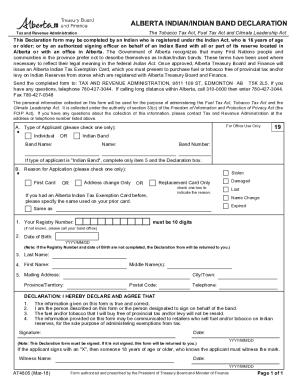
The Canada AT4805 form is essential for individuals or authorized representatives seeking an Alberta Indian Tax Exemption Card. This guide will walk you through each section of the form, ensuring you can complete it accurately and efficiently.
Follow the steps to successfully complete the Canada AT4805 form.
- Click the ‘Get Form’ button to obtain the form and open it in the editor.
- Choose the type of applicant by selecting one of the options: Individual or Indian Band. If you select Indian Band, complete only item 5 and the Declaration box.
- Indicate the reason for application by checking the appropriate box: First Card, Stolen, Damaged, Replacement Card Only, or Address Change Only.
- If applicable, specify the name used on your prior card if you had an Alberta Indian Tax Exemption Card before.
- Enter your Registry Number, ensuring it is 10 digits. If you do not know this number, please reach out to your band office for assistance.
- Fill in the Date of Birth in the format YYYY/MM/DD. Note that both the Registry Number and Date of Birth must be completed to avoid form rejection.
- Provide your Last Name, First Name, and any Middle Name(s) in the designated fields.
- Complete the Mailing Address section with your Province/Territory, City/Town, Postal Code, and Telephone number.
- In the Declaration section, read and confirm the statements by signing the form. Ensure you include the date in YYYY/MM/DD format.
- If you sign with an 'X', have someone who knows you and is 18 years or older witness your signature and provide their name and date.
- Review all entries for accuracy. Once satisfied, you can save changes, download, print, or share the completed form.
Complete your Canada AT4805 form online to ensure timely processing of your application.