Loading
Get Ny Ldss-3151 2018-2026
How it works
-

Open form follow the instructions
-

Easily sign the form with your finger
-

Send filled & signed form or save
How to fill out the NY LDSS-3151 online
Filling out the NY LDSS-3151 form is an essential part of managing your Supplemental Nutrition Assistance Program (SNAP) benefits. This guide offers a clear, step-by-step approach to help you complete the form accurately and efficiently online.
Follow the steps to fill out the NY LDSS-3151 effectively.
- Press the ‘Get Form’ button to obtain the NY LDSS-3151 and access it in your online editor.
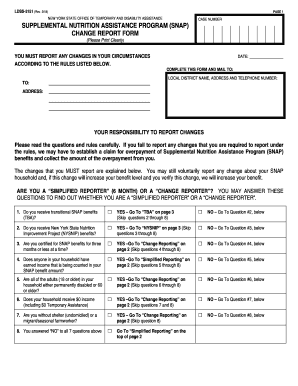
- Begin by entering your case number at the top of the form. Ensure this is printed clearly to avoid any processing delays.
- Fill in the date when you are completing the form. This is crucial for tracking your report.
- Clearly print the local district name, address, and telephone number where the completed form should be mailed. Double-check for accuracy.
- In the section regarding your responsibility to report changes, read the provided rules carefully to understand the implications of not reporting.
- Identify your reporting type by answering the questions regarding whether you receive transitional SNAP benefits or are classified under NYSNIP. Follow the flow based on your answers.
- If you qualify under simplified or change reporting rules, read the associated sections carefully to understand what changes must be reported.
- Use the provided sections to report any changes in household income, costs, or changes affecting your household composition.
- At the bottom of the form, you will see sections for reporting your new address, any changes in housing costs, and updates regarding vehicles and savings. Fill these out as applicable.
- Once you have completed all relevant sections, review your entries for accuracy before saving your changes, downloading, or printing the form for submission.
Complete your NY LDSS-3151 online today to ensure your SNAP benefits are up to date.
Reporting changes to your food stamp situation online in NY is straightforward. You can visit the NY State Department of Social Services website and navigate to the SNAP section. Here, you can access the necessary forms and submit updates according to the guidelines set forth in the NY LDSS-3151. Streamlining this process makes managing your benefits much easier.