Loading
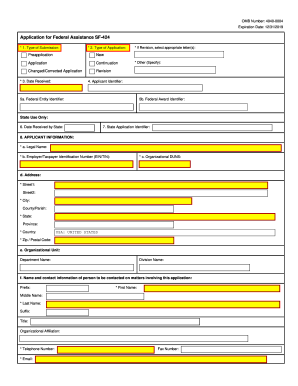
Get Omb Sf-424 2012
How it works
-

Open form follow the instructions
-

Easily sign the form with your finger
-

Send filled & signed form or save
How to fill out the OMB SF-424 online
The OMB SF-424 form is a crucial document for individuals and organizations applying for federal assistance. This guide provides clear, step-by-step instructions to assist users in completing the form accurately and efficiently online.
Follow the steps to fill out the OMB SF-424 form effectively.
- Click ‘Get Form’ button to obtain the form and open it for editing.
- Select the type of submission that applies to your situation from the options provided: Preapplication, New Application, Continuation, Changed/Corrected Application, or Revision. Ensure to check the appropriate box.
- If applicable, input the date received and indicate if this is a revision by selecting the relevant letters.
- Enter the applicant identifier, which will be provided by Grants.gov upon submission.
- Provide the federal entity identifier and federal award identifier, which may also be obtained from previous interactions with federal agencies.
- Fill in the applicant information, including the legal name, Employer/Taxpayer Identification Number (EIN/TIN), and Organizational DUNS. Additionally, complete the address section with all relevant details.
- Provide the name and contact information of a person involved with the application, making sure to include their telephone number and email address.
- Select the type of applicant, indicating up to three types if necessary, and specify any other types if applicable.
- Enter the name of the federal agency you are applying to, along with the Catalog of Federal Domestic Assistance (CFDA) number and title.
- Input the funding opportunity number and title related to your application.
- Provide information on areas affected by the project, attaching additional documents if necessary.
- Fill in the descriptive title of your project and attach any supporting documents as specified in agency instructions.
- Input the congressional districts for the applicant and project, and attach an additional list if needed.
- Detail the proposed project start and end dates.
- Estimate the funding amounts for federal, applicant, state, local, other, program income, and provide the total funding amount.
- Indicate if the application is subject to review by state under Executive Order 12372, and complete the subsequent questions as necessary.
- Respond to the question regarding any delinquent federal debt, providing an explanation if applicable.
- Review the certification statement and ensure agreement by selecting the 'I AGREE' option.
- Complete the signature section for the authorized representative, including necessary contact information.
- Once all sections are thoroughly reviewed and completed, save changes, download the application, print, or share the form as required.
Begin filling out your OMB SF-424 form online today.
Get form
Experience a faster way to fill out and sign forms on the web. Access the most extensive library of templates available.
You would use Standard Form 424A to provide a clear and organized budget for your grant proposal. This form is part of the OMB SF-424 suite and helps ensure that your funding request is detailed and complete. Including a well-prepared 424A increases transparency and improves your odds of securing funding.
Get This Form Now!
Use professional pre-built templates to fill in and sign documents online faster. Get access to thousands of forms.