Loading
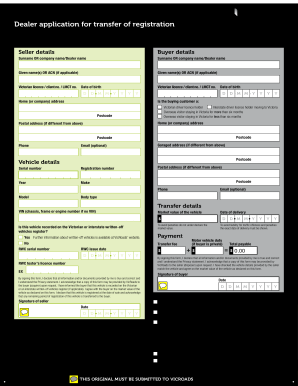
Get Au Vicroads Dealer Application For Transfer Of Registration 2012-2025
How it works
-

Open form follow the instructions
-

Easily sign the form with your finger
-

Send filled & signed form or save
How to fill out the AU VicRoads Dealer Application For Transfer Of Registration online
Filling out the AU VicRoads Dealer Application For Transfer Of Registration online is an essential step in ensuring a smooth transfer of vehicle ownership. This guide will walk you through each section of the form, providing detailed instructions to support users with varying levels of experience.
Follow the steps to successfully complete your application online.
- Click ‘Get Form’ button to acquire the application form and open it for completion.
- Begin by entering the seller's details in the designated fields. Provide the surname or company name, given names or ACN if applicable, and Victorian licence number or client number along with the date of birth.
- Next, fill in the buyer's details. Include their surname or company name, given names or ACN if applicable, as well as their Victorian licence number or client number and date of birth.
- Complete the home or company address for both the seller and buyer, including the postcode. If there is a postal address that is different from the home address, include that as well.
- Enter the vehicle details including its serial number, registration number, year, make, model, and body type.
- Provide transfer details, including the RWC serial number and issue date, and any notes about the vehicle being recorded on the written-off vehicles register.
- Indicate the details regarding payment, including the transfer fee and motor vehicle duty if applicable. Ensure you declare the market value correctly to avoid penalties.
- Both the seller and buyer must sign and date the form, affirming that all provided information is true and accurate. Review the privacy statement before signing.
- Once everything is complete, you can save changes, download, print, or share the form as needed for further processing.
Complete your vehicle registration transfer application online today to ensure your transaction is processed efficiently.
Transfer to/from a family member a completed vehicle transfer form [PDF 678 Kb] signed by the nominee in the acquirer section. a statement or letter, signed by the nominee and the minor, that confirms the nominee is acquiring the vehicle on behalf of the minor. the name and Victorian residential address of the nominee.
Industry-leading security and compliance
US Legal Forms protects your data by complying with industry-specific security standards.
-
In businnes since 199725+ years providing professional legal documents.
-
Accredited businessGuarantees that a business meets BBB accreditation standards in the US and Canada.
-
Secured by BraintreeValidated Level 1 PCI DSS compliant payment gateway that accepts most major credit and debit card brands from across the globe.