Loading
Get Canada Form N6 2015-2026
How it works
-

Open form follow the instructions
-

Easily sign the form with your finger
-

Send filled & signed form or save
How to fill out the Canada Form N6 online
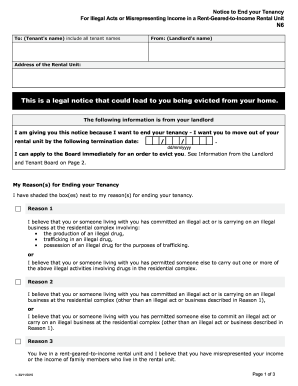
This guide provides comprehensive instructions on how to fill out the Canada Form N6 online, which is a legal notice to end a tenancy. The process can seem complicated, but this guide aims to simplify each step for users with varying levels of legal experience.
Follow the steps to complete the Canada Form N6 successfully.
- Click ‘Get Form’ button to obtain the form and open it in the editor.
- Enter the tenant's name or all tenant names in the designated field. This ensures that all affected parties are clearly identified in the notice.
- Insert the landlord's name in the specified section to indicate who is issuing the notice.
- Provide the address of the rental unit in the indicated box, making sure to include all necessary details for accurate identification.
- Fill out the termination date in the format dd/mm/yyyy. Ensure this date complies with the required notice period based on the reason for ending the tenancy.
- Select the reason(s) for ending the tenancy by shading the appropriate box(es). These reasons may include illegal acts related to drugs or misrepresentation of income.
- Detail the specific events that led to the issuance of this notice. This includes entering the dates, times, and descriptions of the relevant events.
- Complete the signature section by providing the landlord's name, phone number, and the date. If applicable, fill in the representative's information as well.
- Once all information is accurately entered, save your changes, then proceed to download, print, or share the completed form as necessary.
Complete your Canada Form N6 online today to ensure all deadlines are met and to safeguard your rights.
The NR6 Form is a Canada Revenue Agency (CRA) document that a non-resident who has received a rent or timber royalty payment in Canada must submit to the agency to declare their intent to file an income tax return for that year.