Loading
Get Nj Active/associate Membership Application - Green Village 2021-2026
How it works
-

Open form follow the instructions
-

Easily sign the form with your finger
-

Send filled & signed form or save
How to fill out the NJ Active/Associate Membership Application - Green Village online
This guide offers clear and detailed instructions on completing the NJ Active/Associate Membership Application for Green Village online. Following these steps will help ensure a smooth application process.
Follow the steps to successfully complete your application.
- Click ‘Get Form’ button to obtain the form and open it for editing.
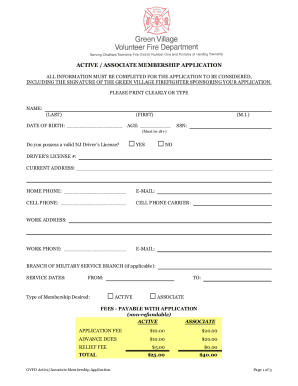
- Begin by entering your personal information. Clearly print or type your name (last, first, middle initial), date of birth, and age. Ensure you input your social security number, as applicants must be at least 18 years old.
- Indicate whether you possess a valid NJ driver's license by selecting yes or no. If yes, provide your driver's license number.
- Fill in your current address, home phone number, email address, and cell phone number, ensuring accuracy for effective communication.
- If applicable, provide your work address, work phone number, and work email to facilitate employer communication.
- For military applicants, enter your branch of military service and service dates, if relevant.
- Select the type of membership you desire: 'Active' or 'Associate.' Ensure you understand the membership requirements before making your selection.
- Calculate and include the necessary fees as specified on the application. Remember, fees are non-refundable.
- Respond to health-related questions, particularly if you have any physical conditions that may affect your ability to serve as an Active member. If you answer yes, provide a brief explanation.
- If you have previous firefighting experience, courses, or seminars, indicate this by selecting yes and provide relevant details.
- At the end of the application, ensure you and your sponsoring firefighter have signed and dated the form to validate your application. If you are under 21, a parent or guardian's signature is also required.
- Finalize your application by reviewing all provided information for accuracy. Once verified, save your changes, and proceed to download, print, or share the completed form.
Get started on your application online today!