Loading
Get Az Aac R3-5-102 2002-2026
How it works
-

Open form follow the instructions
-

Easily sign the form with your finger
-

Send filled & signed form or save
How to fill out the AZ AAC R3-5-102 online
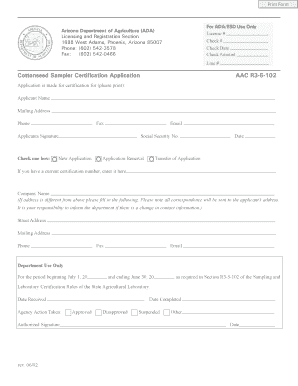
Filling out the AZ AAC R3-5-102 form for cottonseed sampler certification is a straightforward process that can be completed online. This guide provides detailed steps to help you successfully complete each section of the form with confidence.
Follow the steps to complete your certification application online.
- Press the ‘Get Form’ button to access the AZ AAC R3-5-102 form and open it for editing.
- Begin by filling in your name in the 'Applicant Name' field. This should be your full legal name as it appears on official documents.
- Provide your mailing address in the designated field. Ensure that this address is where you wish to receive correspondence.
- Enter your phone number in the 'Phone' field, and if applicable, include your fax number.
- Input your email address in the specified field for digital correspondence.
- Sign the application by providing your signature in the required section.
- Choose the appropriate certification type by checking one of the boxes labeled 'New Application', 'Application Renewal', or 'Transfer of Application'.
- If you are renewing or transferring your application, include your existing certification number in the specified field.
- Fill in 'Company Name' if applicable, and provide the company’s street address, mailing address, phone, fax, and email if different from the applicant's.
- Make sure to review all entered information for accuracy before proceeding to submit the form.
- After completing the form, save your changes, download a copy if necessary, and print or share the application as needed.
Complete your AZ AAC R3-5-102 application online today.