Loading
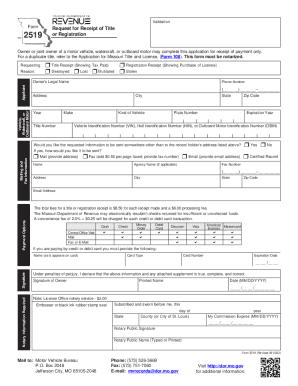
Get Form 2519 - Request For Receipt Of Title Or Registrationform 2519 - Request For Receipt Of Title Or
How it works
-

Open form follow the instructions
-

Easily sign the form with your finger
-

Send filled & signed form or save
How to fill out the Form 2519 - Request For Receipt Of Title Or Registration online
Filling out Form 2519 - Request For Receipt Of Title Or Registration online can be a straightforward process when you understand each component. This guide will provide you with step-by-step instructions to ensure you complete the form correctly and efficiently.
Follow the steps to successfully complete your request
- Click ‘Get Form’ button to obtain the form and open it in the editor.
- In the 'Requesting' section, select whether you are requesting a 'Title Receipt' or a 'Registration Receipt' and indicate the reason such as 'Lost', 'Stolen', 'Mutilated', or 'Destroyed'.
- Fill in the 'Owner’s Legal Name', 'Phone Number', and 'Address' fields. Make sure to provide accurate information to avoid any processing delays.
- In the 'Vehicle, Watercraft, or Outboard Motor' section, enter details such as 'Year', 'Make', 'Title Number', 'Plate Number', 'Expiration Year', and 'Vehicle Identification Number (VIN)', 'Hull Identification Number (HIN)', or 'Outboard Motor Identification Number (OBIN)'.
- Indicate if you would like the requested information sent to an address different from the one provided. Choose your preferred method of delivery: Mail, Fax, or Email and provide the necessary information.
- Select your payment options from the list provided. Enter payment details, including the type of card, card number, expiration date, and the name as it appears on the card.
- Sign and date the form in the designated 'Signature of Owner' section. Ensure that the signature matches the name provided in the 'Owner’s Legal Name' field.
- Complete the notary section where required. This includes the notary's signature, name, and seal, confirming the statement made under penalties of perjury.
- Review all sections for accuracy. Once completed, save your changes, and then you can download, print, or share the form as required.
Complete your Form 2519 online today for a smooth and efficient request process.
Get form
Experience a faster way to fill out and sign forms on the web. Access the most extensive library of templates available.
You will pay: The $8.50 title fee and the $6 processing fee; and. State tax of 4.225 percent, plus your local sales tax Document on the purchase price, less trade-in allowance, if any. Our online sales tax calculator may help you estimate the taxes you will pay.
Get This Form Now!
Use professional pre-built templates to fill in and sign documents online faster. Get access to thousands of forms.
Industry-leading security and compliance
US Legal Forms protects your data by complying with industry-specific security standards.
-
In businnes since 199725+ years providing professional legal documents.
-
Accredited businessGuarantees that a business meets BBB accreditation standards in the US and Canada.
-
Secured by BraintreeValidated Level 1 PCI DSS compliant payment gateway that accepts most major credit and debit card brands from across the globe.