Loading
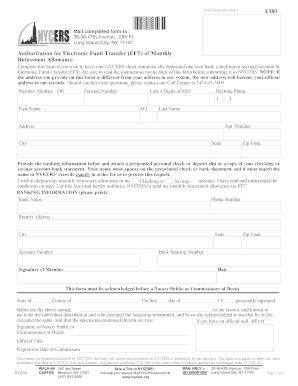
Get Ny Nycers F380 2016-2026
How it works
-

Open form follow the instructions
-

Easily sign the form with your finger
-

Send filled & signed form or save
How to fill out the NY NYCERS F380 online
The NY NYCERS F380 form allows users to authorize electronic fund transfers for their monthly retirement allowance. This guide provides clear, step-by-step instructions to assist users in completing the form accurately and submitting it effectively.
Follow the steps to complete the NY NYCERS F380 online
- Click ‘Get Form’ button to obtain the form and open it in your editor.
- Fill in your member number or pension number, along with the last four digits of your Social Security number and your daytime phone number.
- Provide your first name, middle initial (if applicable), last name, and your complete address including apartment number, city, state, and zip code.
- In the banking information section, input your bank name, bank phone number, and branch address including city, state, and zip code.
- Enter your account number and bank routing number accurately.
- Indicate whether you wish to deposit your monthly retirement allowance into a checking or savings account.
- Attach a preprinted personal check or deposit slip, or a copy of your banking statement that shows your name matching exactly with NYCERS' records.
- Sign and date the form as the member.
- Have the form acknowledged before a Notary Public or Commissioner of Deeds, ensuring the notary completes their part.
- Review all information for accuracy and completeness before submitting.
- Save your changes, download or print the completed form, and mail it to the specified address.
Complete your documents online today to ensure smooth processing of your retirement payments.