Loading
Form preview
  • US Legal Forms
  • Other Templates
  • More Forms
  • More Multi-State Forms
  • Meredith College Declaration Of Major 2009

Get Meredith College Declaration Of Major 2009-2026

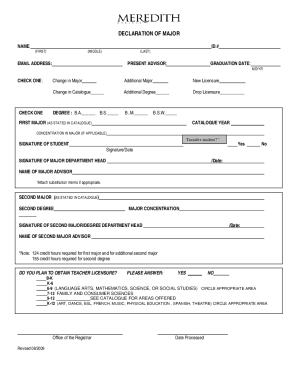
DECLARATION OF MAJOR NAME:ID.# (FIRST)(MIDDLE)(LAST)PRESENT ADVISOR:EMAIL ADDRESS:GRADUATION DATE: MO/YRCHECK ONE:CHECK ONEChange in MajorAdditional MajorNew LicensureChange in Catalogue Additional.

How it works

  1. Open form

    Open form follow the instructions

  2. Easily sign form

    Easily sign the form with your finger

  3. Share form

    Send filled & signed form or save

How to fill out the Meredith College Declaration Of Major online

The Meredith College Declaration Of Major form is an essential document for students looking to declare or change their major. This guide will provide you with a comprehensive overview and step-by-step instructions to complete the form accurately and efficiently.

Follow the steps to successfully fill out the form.

  1. Click ‘Get Form’ button to obtain the form and open it in the editor.
  2. Begin by filling in your name, including first, middle, and last names. Ensure that the information entered is accurate and matches your records.
  3. Enter your student ID number. This is an important identifier for your student record.
  4. Provide the name of your current advisor in the designated field.
  5. Input your email address to ensure effective communication regarding your declaration.
  6. Specify your expected graduation date by entering the month and year.
  7. Select one option indicating your intention: change in major, additional major, new licensure, change in catalogue, additional degree, or drop licensure.
  8. Indicate the degree you are pursuing; options include B.A., B.S., B.M., and B.S.W.
  9. Fill in your first major as it is stated in the college catalogue, along with the applicable catalogue year.
  10. If relevant, provide details for any concentration in your major.
  11. Indicate if you are a transfer student by selecting 'Yes' or 'No.'
  12. Sign and date the form to certify the information provided is accurate.
  13. Have your major department head sign the form, ensuring that they provide their name and date as well.
  14. If you are declaring a second major or degree, repeat steps 9 through 13 for the second area of study.
  15. Indicate whether you plan to obtain teacher licensure by selecting 'Yes' or 'No' and provide details on the appropriate areas if applicable.
  16. Review all information filled in to check for accuracy before submission.
  17. Once completed, save any changes made and download, print, or share the form as needed.

Take action now and complete your Meredith College Declaration Of Major online.

Get form

Experience a faster way to fill out and sign forms on the web. Access the most extensive library of templates available.
Get form

Related content

Preliminary Information - SEC.gov
A Registration Statement on Form 10 relating to these securities has been filed...
Learn more
Declaration of Major
DECLARATION OF MAJOR. NAME: (FIRST). (MIDDLE) ... CONCENTRATION IN MAJOR (IF APPLICABLE)...
Learn more
Eliminating Youth Electronic Cigarette and other...
Jan 29, 2019 — And youth engage in many far more harmful behaviors than nicotine use...
Learn more

Related links form

How To Report Changes To Income At Dss Va Form Medicaid Application For Medically Indigent Pregnant Women Form 032 03 040 Dmas260 Wsdot Forms

Questions & Answers

Get answers to your most pressing questions about US Legal Forms API.

Contact support

We aspire to be nationally recognized for exceptional business education, preparing undergraduate women and graduate students to inspire, create, and lead with integrity in the global economy.

Once you've decided what you want to major in, declaring a major is easy: Decide on the academic program. Ask a faculty member in the program to be your major advisor. Complete and submit the Declaration of Major Form [pdf] to the Registrar's Office. The form can be sent via email to degreeaudit@wm.edu from either.

Strong Experiences Meredith offers more than 90 majors, minors, and academic programs – including the option to design your own. And our students apply their learning in a variety of ways. In fact, 97% of our students participate in experiential learning such as internships, study abroad, and undergraduate research.

Meredith College MottoLux (Latin)TypePrivate women's liberal arts college and coeducational graduate schoolEstablished1891Endowment$114.6 million (2020)PresidentJo Allen10 more rows

Located on North Blount Street in Raleigh, North Carolina, the Baptist Female University graduated its first class of ten students in 1902. From 1904 until 1909, the university underwent two name changes: becoming Baptist University for Women in 1904 and Meredith College (in recognition of Thomas Meredith) in 1909.

Meredith College is a private institution that was founded in 1891. It has a total undergraduate enrollment of 1,427 (fall 2021), its setting is urban, and the campus size is 225 acres. It utilizes a semester-based academic calendar.

Meredith College is a private women's liberal arts college and coeducational graduate school in Raleigh, North Carolina. As of 2021 Meredith enrolls approximately 1,500 women in its undergraduate programs and 300 men and women in its graduate programs.

During the fall semester of 2007, the College launched the Avenging Angels as the official Meredith mascot.

Get This Form Now!

Use professional pre-built templates to fill in and sign documents online faster. Get access to thousands of forms.
Get form
If you believe that this page should be taken down, please follow our DMCA take down processhere.
Get Meredith College Declaration Of Major
Get form
  • Adoption
  • Bankruptcy
  • Contractors
  • Divorce
  • Home Sales
  • Employment
  • Identity Theft
  • Incorporation
  • Landlord Tenant
  • Living Trust
  • Name Change
  • Personal Planning
  • Small Business
  • Wills & Estates
  • Packages A-Z
  • Affidavits
  • Bankruptcy
  • Bill of Sale
  • Corporate - LLC
  • Divorce
  • Employment
  • Identity Theft
  • Internet Technology
  • Landlord Tenant
  • Living Wills
  • Name Change
  • Power of Attorney
  • Real Estate
  • Small Estates
  • Wills
  • All Forms
  • Forms A-Z
  • Other Templates
  • Legal Hub
  • About Us
  • Help Portal
  • Legal Resources
  • Blog
  • Affiliates
  • Contact Us
  • Delete My Account
  • Site Map
  • Industries
  • Forms in Spanish
  • Localized Forms
  • State-specific Forms
  • Forms Kit
  • Real Estate Handbook
  • All Guides
  • Notarize
  • Incorporation services
  • For Consumers
  • For Small Business
  • For Attorneys
  • USLegal
  • FormsPass
  • pdfFiller
  • signNow
  • altaFlow
  • DocHub
  • Instapage
Form Packages
  • Adoption
  • Bankruptcy
  • Contractors
  • Divorce
  • Home Sales
  • Employment
  • Identity Theft
  • Incorporation
  • Landlord Tenant
  • Living Trust
  • Name Change
  • Personal Planning
  • Small Business
  • Wills & Estates
  • Packages A-Z
Form Categories
  • Affidavits
  • Bankruptcy
  • Bill of Sale
  • Corporate - LLC
  • Divorce
  • Employment
  • Identity Theft
  • Internet Technology
  • Landlord Tenant
  • Living Wills
  • Name Change
  • Power of Attorney
  • Real Estate
  • Small Estates
  • Wills
  • All Forms
  • Forms A-Z
  • Other Templates
Customer Service
  • Legal Hub
  • About Us
  • Help Portal
  • Legal Resources
  • Blog
  • Affiliates
  • Contact Us
  • Delete My Account
  • Site Map
  • Industries
  • Forms in Spanish
  • Localized Forms
  • State-specific Forms
  • Forms Kit
Legal Guides
  • Real Estate Handbook
  • All Guides
Prepared for you
  • Notarize
  • Incorporation services
Our Customers
  • For Consumers
  • For Small Business
  • For Attorneys
Our Sites
  • USLegal
  • FormsPass
  • pdfFiller
  • signNow
  • altaFlow
  • DocHub
  • Instapage
Social Media
Call us now toll free:
+1 833 426 79 33
As seen in:
© Copyright 1999-2026 airSlate Legal Forms, Inc. 17 Station Street, Ste. 203, Brookline, MA 02445
  • Your Privacy Choices
  • Terms of Service
  • Privacy Notice
  • Content Takedown Policy
  • Bug Bounty Program