Loading
Get Uk Hmrc R27 2014-2026
How it works
-

Open form follow the instructions
-

Easily sign the form with your finger
-

Send filled & signed form or save
How to fill out the UK HMRC R27 online
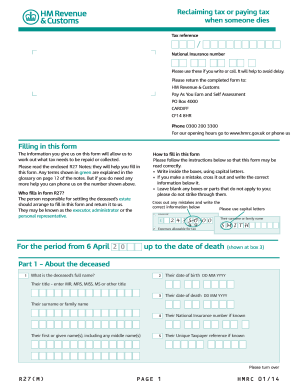
The UK HMRC R27 form is essential for reclaiming or paying tax when someone has passed away. This guide aims to provide clear, step-by-step instructions to help users navigate the online process of filling out this important form.
Follow the steps to fill out the UK HMRC R27 form effectively.
- Press the ‘Get Form’ button to retrieve the UK HMRC R27 form and open it in an appropriate editor.
- Begin by filling out Part 1, which includes providing the deceased's full name, date of birth, date of death, National Insurance number (if known), and Unique Taxpayer reference (if known). Use capital letters for clarity.
- Proceed to Part 2, where you will identify yourself as the person responsible for settling the deceased's estate. Mark the appropriate box indicating your role (executor, administrator, etc.) and provide your contact details.
- In Part 3, give details about the estate’s value and the administration period. Answer questions regarding the value of the estate and whether the administration period has ended.
- Next, if applicable, fill out Part 4, which addresses any trusts created as a result of the deceased's death. Indicate whether there is a trust and provide details of the trustee if there is.
- Continue to Part 5, where you must outline the deceased's financial circumstances prior to their death. This includes declaring incomes, pensions, and any relevant tax relief.
- If applicable, complete Part 6 to provide instructions for any repayments owed. Input necessary banking information if you want payments to be deposited directly.
- If there's a surviving spouse or civil partner, fill out Part 7 with their details. Include relevant dates and the spouse’s National Insurance number (if known).
- In Part 8, decide if you want to authorize someone else to act on your behalf. Provide their details if you choose to do so.
- Finally, complete Part 9 by signing and dating the declaration, ensuring that all information provided is accurate. Save your changes and prepare to submit the form.
- Return the completed form to the address provided on the first page. You may choose to download or print a copy for your records.
Begin your process of filling out the UK HMRC R27 online to manage tax matters efficiently.
The UK Digital Services Tax Act imposes a tax on revenues generated by large companies from their digital services in the UK. This tax targets businesses that have a significant digital presence and ensures they contribute fairly to the economy. Understanding this act can help companies navigate their tax obligations effectively.