Loading
Get Ok Oes-3b 2019-2026
How it works
-

Open form follow the instructions
-

Easily sign the form with your finger
-

Send filled & signed form or save
How to fill out the OK OES-3B online
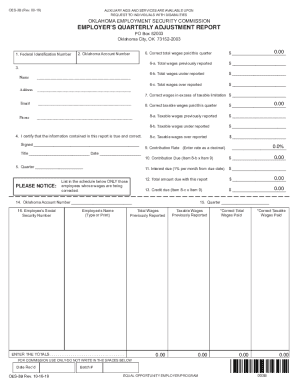
The OK OES-3B is the Employer’s Quarterly Adjustment Report, designed for reporting wage adjustments. This guide provides clear instructions on how to complete the form effectively, ensuring all necessary information is accurately reported.
Follow the steps to successfully complete the OK OES-3B online.
- Click ‘Get Form’ button to access the OK OES-3B and open it in your form editor.
- Enter your Federal Identification Number in the designated field. This is crucial for identifying your business.
- Input your Oklahoma Account Number next. This number is unique to your business within Oklahoma's employment system.
- Provide your business name and the complete address in the corresponding fields.
- Sign and include your title in the area designated for the authorized individual's signature. Ensure that this person has the authority to certify the form.
- Select the quarter and year you are adjusting. Accuracy here is vital for proper processing.
- In Item 6, enter the correct total wages paid this quarter. Item 6-a will automatically calculate the total wages previously reported on the OES-3.
- For Item 6-b, if Item 6 is greater than Item 6-a, enter the total wages that were underreported. If the opposite is true, proceed to Item 6-c.
- In Item 6-c, if Item 6 is less than Item 6-a, enter the total wages that were overreported as a negative figure.
- Input the correct amount of wages in excess of the taxable limitation in Item 7.
- For Item 8, enter the correct taxable wages paid this quarter. Items 8-a, 8-b, and 8-c will autofill based on the previous reporting.
- For Item 8-b, enter the taxable wages underreported if Item 8 exceeds the previously reported taxable wages.
- In Item 8-c, input the taxable wages overreported as a negative amount if Item 8 is less than the previously reported amount.
- Enter the contribution rate for the quarter being adjusted in Item 9 as a decimal (for example, 0.3% should be entered as .003).
- Item 10 will automatically calculate the contribution due based on the entered rate.
- For Item 11, compute the amount of interest due, calculated at 1% per month on the due amount from Item 10.
- Total the amount due for the quarter in Item 12.
- Enter any credit due in Item 13, calculated from Item 8-c and the entered tax rate.
- Reconfirm your Oklahoma Account Number in Item 14.
- For Item 16, list the Social Security Number(s) for the employees subject to correction along with their names. Provide their previously reported total and taxable wages, and then the correct amounts.
- Finally, review all entries for accuracy, save the changes, and you may choose to download, print, or share the completed form as needed.
Complete your OK OES-3B online today to ensure your adjustment is processed smoothly.
The unemployment wage base increased to $27,700 and the tax rate range changed to 0% to 10%. The minimum weekly benefit amount increased form $38 to $40, while the maximum increased from $526 to $560. Effective January 1, 2023, the wage base will increase to $29,100.