Loading
Get Christus Health Plan H1189_mc830_c 2018-2026
How it works
-

Open form follow the instructions
-

Easily sign the form with your finger
-

Send filled & signed form or save
How to fill out the CHRISTUS Health Plan H1189_MC830_C online
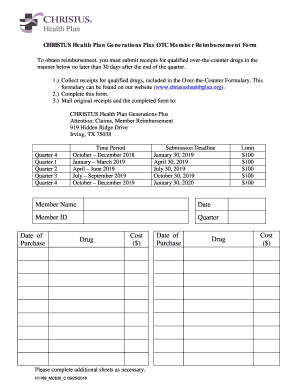
Filling out the CHRISTUS Health Plan H1189_MC830_C online can seem daunting, but this guide will provide you with clear instructions to help you navigate each step with confidence. Follow this user-friendly guide to ensure your reimbursement request is completed accurately.
Follow the steps to complete the CHRISTUS Health Plan H1189_MC830_C online
- Click ‘Get Form’ button to obtain the form and open it in the editor.
- Enter your member name in the designated field to identify your account.
- Fill in the date of completion in the specified area to document when you are submitting the form.
- Input your member ID, ensuring this number is correct for identification purposes.
- Select the quarter during which the purchases were made by checking the appropriate box.
- For each drug, enter the date of purchase in the relevant column.
- List the name of the drug purchased in the designated field.
- Record the cost of each drug in the corresponding space, making sure to remain within the reimbursement limit.
- If necessary, complete additional sheets for any extra drugs purchased that exceed the space provided.
- Review all entered information for accuracy before finalizing the form.
- Once completed, save your changes, download, print, or share the form as needed.
Start filling out your CHRISTUS Health Plan H1189_MC830_C online today!
Call Superior at 1-877-398-9461 to request an appeal by phone, or call Member Services at 1-800-783-5386 for more information.