Loading
Get Canada Esdc Emp5628 2021-2026
How it works
-

Open form follow the instructions
-

Easily sign the form with your finger
-

Send filled & signed form or save
How to fill out the Canada ESDC EMP5628 online
This guide provides clear and supportive instructions to help users complete the Canada ESDC EMP5628 form effectively. Whether you are an employer applying for a Labour Market Impact Assessment for in-home caregiver positions or simply seeking guidance, this comprehensive outline will assist you in navigating each section of the form online.
Follow the steps to complete the Canada ESDC EMP5628 form online.
- Press the ‘Get Form’ button to access the EMP5628 form and open it for online editing.
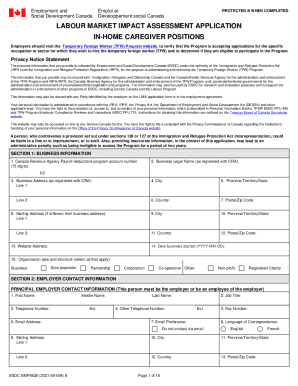
- Fill in Section 1: Business Information. Provide your business's Canada Revenue Agency Payroll deductions program account number, legal name, business address, mailing address (if different), website address, city, province/territory/state, country, postal/zip code, date business started, and organization type.
- Proceed to Section 2: Employer Contact Information. Enter the principal employer's first name, last name, job title, email address, telephone numbers, language of correspondence, and mailing address.
- Complete Section 3: Third-Party Information if applicable. Indicate if a third-party is representing the employer. Provide their contact details and state the nature of their involvement.
- In Section 4: Labour Market Impacts, answer questions regarding hiring a temporary foreign worker. Provide details on job creation, filling labour shortages, and impacts on the Canadian workforce.
- Fill out Section 5: Job Offer Details by specifying the number of foreign workers required, job title, main duties, expected employment duration, and language requirements for the position.
- Complete Section 6: Work Location, describing the primary work location's business activity and any associated safety hazards.
- In Section 7: Hours, Pay and Benefits, provide the wage range, hours of work per day/week, and any additional benefits offered to the temporary foreign worker.
- Proceed to Section 8: Recruitment. Answer whether the position met minimum advertising requirements, detail recruitment efforts made for Canadian applicants, and provide the outcome of recruitment activities.
- If applicable, fill in Section 9: Second Employer Information, detailing the second employer's contact information and role.
- Confirm the employer's financial ability in Section 10. Complete the required income assessments and indicate if additional income sources are available.
- In Section 11: Care Required, provide details about the individual requiring care and the nature of that care.
- If the foreign worker will reside in the employer's home, complete Section 12: Accommodations, ensuring compliance with required living standards.
- Review your input in Section 13: Employer Responsibilities. Acknowledge your obligations toward temporary foreign workers and ensure compliance with applicable laws.
- Utilize the documentation checklist in Section 14 to ensure all necessary documents are included with the submission.
- Complete the declaration sections in Sections 15-17, securing the necessary signatures of the employer and/or third party.
- Once all sections are completed, carefully review the entire form for accuracy. You can then save your changes, download, print, or share the form as required.
Ready to start? Fill out your Canada ESDC EMP5628 form online now!
What Happens After LMIA is Approved. After an LMIA application has been processed, employers will be issued a decision. If the employer is issued a positive LMIA, they can proceed with hiring a foreign national. If a negative LMIA is issued then unfortunately the employer is not approved to hire a foreign national.