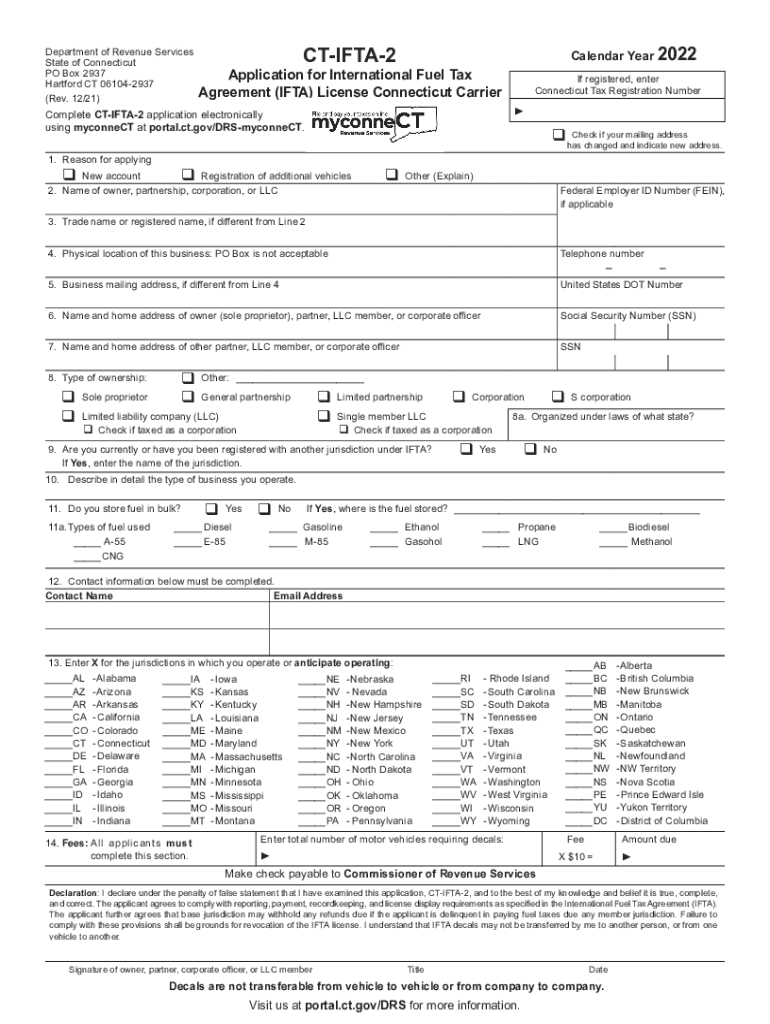
Department of Revenue Services State of Connecticut PO Box 2937 Hartford CT 061042937 (Rev. 12/21)CTIFTA2Application for International Fuel Tax Agreement (IFTA) License Connecticut Carrier registered,.

Open form follow the instructions

Easily sign the form with your finger

Send filled & signed form or save
How to fill out the CT CT-IFTA-2 online
This guide provides a comprehensive overview of how to complete the CT CT-IFTA-2 Application for International Fuel Tax Agreement (IFTA) License online. Designed for users of all experience levels, this step-by-step process aims to streamline your application submission.
Follow the steps to successfully complete and submit your application.
- Click the ‘Get Form’ button to access the CT CT-IFTA-2 application form.
- Indicate the reason for applying in Line 1. Check the appropriate box for a new account, registration of additional vehicles, or other applicable reasons.
- In Line 2, enter the name of the owner, partnership, corporation, or LLC. If applicable, provide the Federal Employer ID Number (FEIN).
- Line 3 requires you to enter the trade name or registered name if it differs from the name in Line 2.
- Provide the physical address of the business in Line 4, ensuring it's not a P.O. Box.
- Line 5 asks for the business mailing address if it differs from the physical location provided in Line 4.
- Fill out Line 6 with the name and home address of the owner, partner, LLC member, or corporate officer. Identify the role accordingly (owner, partner, LLC member, officer).
- In Line 7, provide the name and home address of any other partner, LLC member, or corporate officer, including their Social Security Number (SSN).
- Line 8 requires you to check the appropriate box for your type of ownership. If your ownership is 'Other', specify it in the provided space.
- In Line 9, indicate if you have been registered with another jurisdiction under IFTA. If so, enter the jurisdiction's name.
- Describe your business operations in detail in Line 10.
- In Line 11, check if you store fuel in bulk. If yes, state where the fuel is stored.
- Line 11a asks you to specify the types of fuel used by entering an 'X' next to appropriate options.
- Complete Line 12 with the contact name and email address for correspondence.
- In Line 13, indicate the jurisdictions in which you operate or plan to operate by marking an 'X' next to each relevant jurisdiction.
- Line 14 requires you to enter how many motor vehicles need IFTA decals. Calculate the fee accordingly.
- Ensure the application is signed by the authorized person and includes their title and date.
- Finally, after completing the form, save your changes and choose to download, print, or share the application as needed.
Complete your CT CT-IFTA-2 application online today to ensure compliance and timely processing.
Experience a faster way to fill out and sign forms on the web. Access the most extensive library of templates available.
Related content
Complete this form in blue or black ink only. Do not use staples. Do not use this...
FMCSA Forms · Online Updates for USDOT Number, Operating Authority (MC/MX/FF Numbers)...
2. When leaving each Jurisdiction. 3. At the end of each day or trip. GALLONS. RECEIVED...
Get answers to your most pressing questions about US Legal Forms API.
What is the meaning of IFTA?
IFTA – or the International Fuel Tax Agreement – is a way to simplify how truckers and trucking companies pay their fuel taxes.
What is the full meaning of IFTA?
International Fuel Tax Agreement (IFTA)
What is the phone number for the CT IFTA department?
If you have any questions about the application, you may contact the DRS, Registration Unit between 8:00 a.m. and 5:00 p.m., weekdays, at 860-297-4870.
Do local trucks need IFTA?
Is IFTA required? Yes, federal law requires that commercial truck companies abide by IFTA regulations.
What is the benefit of IFTA?
IFTA is the cooperative agreement between 48 states in the U.S. and 10 provinces in Canada. It allows inter-jurisdictional carriers to report and pay taxes for the fuel their vehicles consume across states. Using a single fuel tax license.
What does IFTA mean in trucking?
IFTA – or the International Fuel Tax Agreement – is a way to simplify how truckers and trucking companies pay their fuel taxes.
Is Connecticut part of IFTA?
Connecticut requires first-time IFTA licensees to register with DRS (the Department of Revenue Services). You are also required to file a form CT-IFTA-2, which is the IFTA license application for Connecticut carriers.
Use professional pre-built templates to fill in and sign documents online faster. Get access to thousands of forms.
If you believe that this page should be taken down, please follow our DMCA take down process here.