Loading
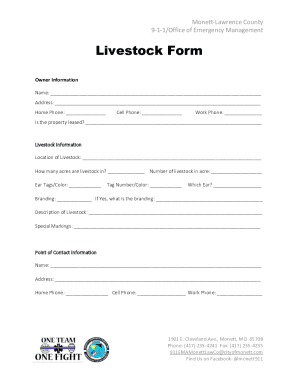
Get Mo Livestock Form - Monett-lawrence County 2020-2026
How it works
-

Open form follow the instructions
-

Easily sign the form with your finger
-

Send filled & signed form or save
How to fill out the MO Livestock Form - Monett-Lawrence County online
Completing the MO Livestock Form - Monett-Lawrence County online is a straightforward process designed to help you provide essential information about your livestock. This guide will walk you through each section of the form step-by-step, ensuring you can fill it out accurately and efficiently.
Follow the steps to complete the MO Livestock Form online
- Click ‘Get Form’ button to obtain the form and open it for editing.
- In the Owner Information section, enter your name, address, and phone numbers. Ensure all contact information is accurate as it will be used for any future communications.
- Indicate whether the property is leased by providing a clear 'Yes' or 'No' response.
- In the Livestock Information section, specify the location of your livestock and provide the number of acres they occupy, as well as the number of livestock on those acres.
- Fill in the Ear Tags and Color information, along with the Tag Number and Color details. Make sure to identify which ear the tag is on.
- If your livestock is branded, indicate 'Yes' and provide the branding details; otherwise, indicate 'No'.
- In the Description of Livestock section, provide a detailed description, including breed, age, and any relevant traits or special markings.
- In the Point of Contact Information section, fill in your name, address, and phone numbers, ensuring this information is correct for prompt communication.
- Once all sections are completed, review the entire form for any errors or omissions.
- Finally, save your changes, and you can download, print, or share the completed form as needed.
Start your form now and ensure your livestock information is accurately documented online.