still an approved foster parent or foster / kinship carer (Scotland)? Yes No From what date did you stop being an approved foster carer or kinship carer (Scotland)? DD MM YYYY Have you enclosed an up-to-date letter of confirmation from the local authority? No Yes If No, we cannot consider your application. What to do next When you have completed this form, send it with your letter of confirmation, where appropriate, to: HMRC National Insurance Contributions & Employer Office Individuals Ca.
Loading

Open form follow the instructions

Easily sign the form with your finger

Send filled & signed form or save
How to fill out the UK HMRC CF411A online
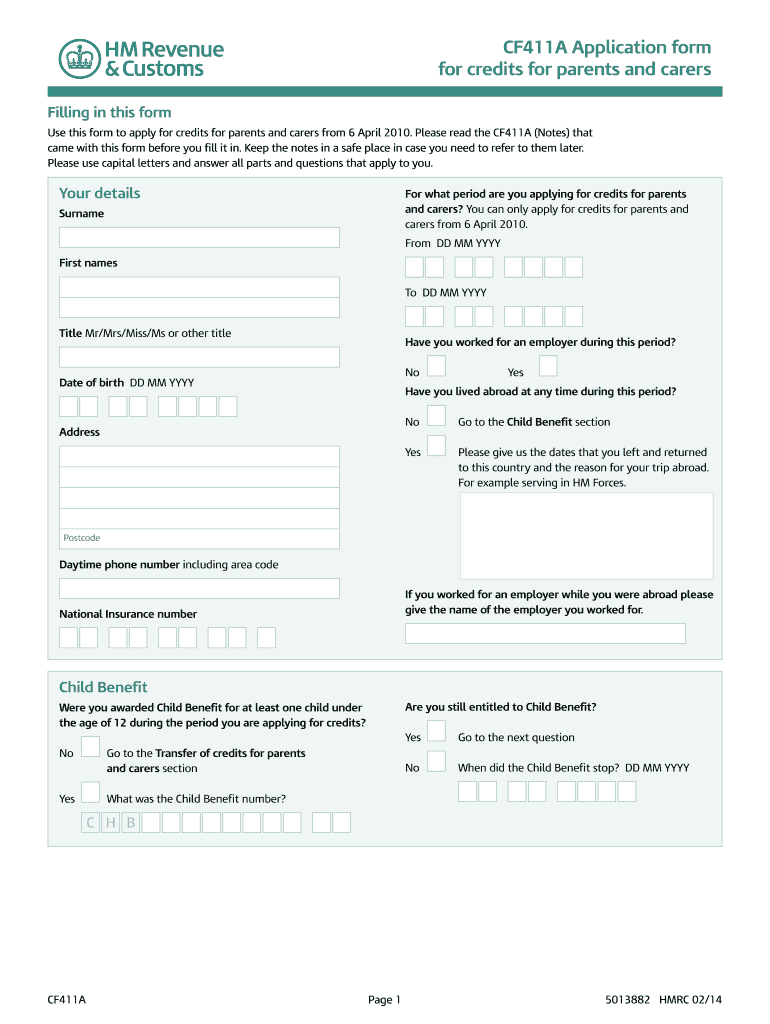
The UK HMRC CF411A form allows individuals to apply for credits for parents and carers, effective from 6 April 2010. This guide will provide clear and concise instructions to help users navigate through the form efficiently and accurately.
Follow the steps to successfully complete the form.
- Press the ‘Get Form’ button to access the CF411A form and open it in the designated editor.
- Enter your personal details in the designated fields. Specify the period for which you are applying for credits from 6 April 2010 and provide your surname and first names.
- State your title (e.g., Mr, Mrs, Miss, Ms) and provide your date of birth. Indicate whether you have worked for an employer during the specified period by selecting ‘Yes’ or ‘No’.
- If you answered ‘Yes’ to having worked for an employer, include information about your employment while abroad, including the employer's name if applicable.
- Provide your current address and postcode, as well as your daytime phone number including the area code.
- If applicable, answer questions regarding your Child Benefit entitlement. Specify whether you were awarded Child Benefit for a child under 12 during the applicable period.
- Detail the children you received Child Benefit for, including their full names, dates of birth, and the details of the non-claiming parent.
- If transferring credits, indicate whether you wish to transfer credits from the Child Benefit claimant’s National Insurance account. Provide relevant dates and information as requested.
- If you are a foster parent or kinship carer (Scotland), fill in the relevant sections with dates and confirmation letter details from your local authority.
- Once all sections are complete, review your information for accuracy. Then save your changes, download, print, or share the completed form as needed.
Complete your HMRC CF411A application online to ensure you receive your credits for parents and carers.
Experience a faster way to fill out and sign forms on the web. Access the most extensive library of templates available.
Related content
Oct 21, 2020 — OPM.gov CH2 Child Benefit claim form - gov.uk INSTRUCTIONS ... You can do...
Get answers to your most pressing questions about US Legal Forms API.
Can grandparents claim for looking after grandchildren in the UK?
In certain circumstances, grandparents may be able to claim financial support for looking after their grandchildren in the UK. Eligibility often depends on specific conditions, such as the nature of the care provided and residency status. Connection with rules under UK HMRC CF411A can help clarify any potential claims for financial assistance.
How does a person determine whether they are resident in the UK?
Determining UK residency involves using specific tests set by HMRC, such as the number of days spent in the UK over a tax year. Additional factors like family ties and your permanent home play a role in this assessment. The residency tests can get complicated, so reviewing resources related to UK HMRC CF411A can provide you with clarity.
Am I still a UK resident if I live abroad?
Living abroad does not automatically mean you cease to be a UK resident. Factors such as the number of days spent in the UK and your ties to the country will determine your residency status. You may remain a UK resident for tax purposes if these connections are significant. Investigating the implications of UK HMRC CF411A will help clarify your residency scrutiny.
How to tell HMRC you are no longer working?
To notify HMRC that you are no longer working, you must inform them of your change in employment status through appropriate channels. This often includes updating your tax records to avoid any potential issues. Ensuring that HMRC has your latest employment details helps in managing your tax responsibilities effectively. Referencing UK HMRC CF411A can guide you in this process.
What do I need to do if I am leaving the UK?
If you're planning to leave the UK, start by notifying HMRC and settling any existing tax liabilities. Review your banks, utilities, and subscriptions, and ensure they are updated with your new address. Additionally, consider your National Insurance contributions to avoid future complications. Resources like UK HMRC CF411A can provide you with comprehensive steps to follow.
How do I tell HMRC I am no longer a UK resident?
To inform HMRC that you are no longer a resident, you need to submit a specific form indicating your departure. This process requires you to provide information about your new location and your departure date. Keeping HMRC updated ensures that your tax records remain accurate. Assistance through platforms like uslegalforms can facilitate this communication regarding UK HMRC CF411A.
Am I UK resident HMRC?
To establish if you are a UK resident according to HMRC, you need to review the residency tests HMRC has set. Factors include the number of days spent in the UK and your connections to the country. If you meet the criteria as per these tests, you will be classified as a UK resident. Familiarizing yourself with UK HMRC CF411A can provide valuable information on your residency status.
How do I know if I am an UK resident?
Determining UK residency involves assessing where you spend your time. The UK uses a specific set of rules, including the number of days you spend in the country within a tax year. If you reside in the UK for 183 days or more, you are typically considered a UK resident. For clarity, resources related to UK HMRC CF411A can guide you in making this determination.
Who do I need to notify when I leave the UK?
When you leave the UK, you need to notify HMRC, your bank, and potentially your employer if you have been employed. It's a good practice to inform local authorities and update any subscriptions or memberships you may hold. Keeping these organizations informed can help you manage your affairs better when residing abroad. You can find assistance for notifications through the UK HMRC CF411A guidelines.
How do I tell HMRC I left the UK?
Informing HMRC that you have left the UK involves completing specific paperwork. You must fill out a form and send it to them, detailing your departure date and your new address abroad. It is vital to keep HMRC informed to avoid future complications regarding tax obligations. Using services like uslegalforms can simplify the process of completing and submitting these forms related to UK HMRC CF411A.
Use professional pre-built templates to fill in and sign documents online faster. Get access to thousands of forms.
If you believe that this page should be taken down, please follow our DMCA take down process here.