Loading
Get Canada Inklusiv Vendor Questionnaire 2009-2026
How it works
-

Open form follow the instructions
-

Easily sign the form with your finger
-

Send filled & signed form or save
How to fill out the Canada Inklusiv Vendor Questionnaire online
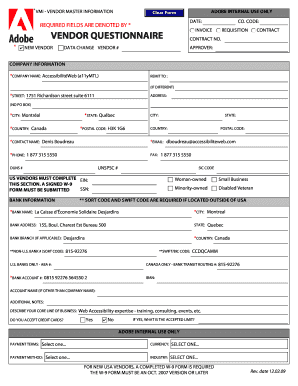
Completing the Canada Inklusiv Vendor Questionnaire is an essential step for new vendors wishing to engage in business. This guide provides clear instructions to ensure you fill out the form accurately and effectively.
Follow the steps to complete your questionnaire easily.
- Press the ‘Get Form’ button to access the questionnaire and open it in the designated application.
- Indicate whether you are a new vendor by checking the appropriate box next to 'New Vendor'.
- Fill in all required fields marked with an asterisk (*). Start by entering your company name in the 'Company Name' field.
- Provide your 'Street Address', ensuring it does not include a P.O. Box. Follow this by entering your 'City', 'State', and 'Postal Code'.
- Complete the 'Contact Name', 'Email', and 'Phone' fields. Make sure your email is accurate as this will be used for communication.
- In the 'Bank Information' section, fill in the required details including 'Bank Name', 'Bank Account Number', and relevant 'SWIFT/BIC Code'.
- Describe your core line of business in the designated area and indicate whether you accept credit cards.
- Review all entered information for accuracy before moving forward. Make any necessary corrections.
- Once you have completed the form, save your changes, and then you can choose to download, print, or share the completed form as needed.
Start filling out your Canada Inklusiv Vendor Questionnaire online today.
The vendor risk assessment questionnaire is a set of technical questions that provides information on a company's security and compliance policies and procedures. It is also known as a security questionnaire, third-party risk assessment questionnaire, or cloud security questionnaire.